Serial API¶
The Serial API allows users and developers to interact with their CCOS powered device over a serial connection. This can be used to add and remove chords, change advanced parameters, and perform common commands such as resetting keymaps or resetting the device to factory settings. You can utilize this serial API by using any serial terminal such as serialterminal.com on a serial enabled web browser. The serial connection operates at a baud rate of 115200 bps. In general, a success returns a 0 at the end, while a failure returns a number greater than zero, which represents an error code. When sending Serial API commands to a CharaChorder device, allow for at least 100 microseconds (us) between commands to allow time for the commands to be processed on the device. If there is no time allowed to process commands on the device, then the serial input buffer on the device can fill up and overflow, causing a system crash. Ideally, sequential Serial API commands should be called in a restful manner by waiting for a response from the previous command.
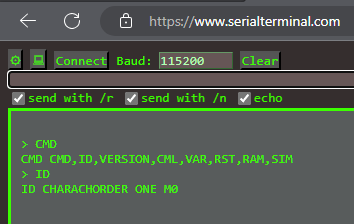
Running some simple commands on serialterminal.com¶
Warning
Parameter and keymaps changes, when committed, will degrade the flash chip over time (generally a minimum of 10,000 to 25,000 commits are expected to be stable). If you use the commands below, keep in mind that if you accidentally write a program that unnecessarily commits parameters to your device you can wear it out prematurely. If you plan to programmatically change layouts, for example, you shouldn’t commit the changes unless you need them to persist after power loss.
Chords are stored on external flash and have a minimum of 100,000 commits before any degradation could be expected; however, we have a custom wear leveling algorithm that targets specific sectors so this should extend much farther and is less of a concern.
Note
Throughout this document, lines prefixed with a “>” symbol represent user input in the examples shown.
Note
Two tables on this page are generated from published data: the parameter codes and the action codes, both read from the Firmware Meta API. Everything that describes the wire format itself — the commands, their subcommands, the keymap codes, the chord bit layout — is written by hand, because CCOS publishes nothing machine-readable for it. The firmware repository points at this page for the Serial API, and offers one other reference: a hand-written TypeScript client in DeviceManager.
Commands Overview¶
Commands are all caps ASCII characters. The return is always one line and includes the command in the return line along with some of the relevant input arguments as well. This makes it more restful and stateless as compared to previous versions of the Serial API.
Command |
Description |
|---|---|
Lists available commands. |
|
Identifies device, such as CHARACHORDER ONE M0. |
|
Returns the current firmware version, such as 1.1.1 |
|
Used for getting, setting (adding or overwriting), and deleting chordmaps. |
|
Used for getting and settings parameters; this includes setting custom chordmaps. |
|
Restarts/reboots the microcontroller hardware. It has additional arguments for Factory and Bootloader. |
|
Prints the current amount of SRAM available; this is primarily used for debugging. |
|
Simulates/injects a chord and outputs the chord output if the chord exists in the chord library; this is primarily used for debugging. |
Commands¶
This section covers the various commands, what they expect, what they return, and has examples of how to use them.
CMD¶
The CMD command lists out all of the commands in the Serial API. All of the commands are returned in one comma-delimited line. All commands are uppercase ASCII characters.
I/O |
Index |
Name |
Type |
Example |
Notes |
|---|---|---|---|---|---|
INPUT |
0 |
Command |
Chars |
CMD |
|
OUTPUT |
0 |
Command |
Chars |
CMD |
|
OUTPUT |
1 |
Command List |
Chars |
CMD,ID,VERSION,CML,VAR,RST,RAM,SIM |
Comma delimited |
Example(s):
> CMD
CMD CMD,ID,VERSION,CML,VAR,RST,RAM,SIM
ID¶
The ID command returns the ASCII name of the device, including the chipset code. This can be used to identify the correct serial device attached to the computer.
I/O |
Index |
Name |
Type |
Example |
Notes |
|---|---|---|---|---|---|
INPUT |
0 |
Command |
Chars |
ID |
|
OUTPUT |
0 |
Command |
Chars |
ID |
|
OUTPUT |
1 |
Company |
Chars |
CHARACHORDER |
|
OUTPUT |
2 |
Device |
Chars |
ONE |
ONE, LITE, ENGINE, or X |
OUTPUT |
3 |
Chipset |
Chars |
M0 |
M0 or S2 |
Example(s):
> ID
ID CHARACHORDER ONE M0
VERSION¶
The VERSION command returns the current version of the CCOS firmware.
I/O |
Index |
Name |
Type |
Example |
Notes |
|---|---|---|---|---|---|
INPUT |
0 |
Command |
Chars |
VERSION |
|
OUTPUT |
0 |
Command |
Chars |
VERSION |
|
OUTPUT |
1 |
Command List |
Chars |
1.1.1 |
Period delimited of MAJOR.MINOR.BUILD |
Example(s):
> VERSION
VERSION 1.1.1
CML¶
The CML command provides access to the Chordmap Library.
CML SubCommand |
Code |
Description |
|---|---|---|
C0 |
Gets the (decimal) number of chordmaps. |
|
C1 |
Gets a chordmap by the index number (hexadecimal uint16) if within range. |
|
C2 |
Gets a chordmap by the chord (hexadecimal) value if it is found in the library. |
|
C3 |
Sets a chordmap with a chord and output bytes (hexadecimal). |
|
C4 |
Deletes a chordmap from the library if the chord exists. |
GET_CHORDMAP_COUNT¶
I/O |
Index |
Name |
Type |
Example |
Notes |
|---|---|---|---|---|---|
INPUT |
0 |
Command |
Chars |
CML |
|
INPUT |
1 |
SubCommand |
Hexadecimal CML Code |
C0 |
Get chordmap count |
OUTPUT |
0 |
Command |
Chars |
CML |
|
OUTPUT |
1 |
SubCommand |
Hexadecimal CML Code |
C0 |
|
OUTPUT |
2 |
Data Out |
Decimal Number |
1347 |
Example(s):
> CML C0
CML C0 1347
GET_CHORDMAP_BY_INDEX¶
I/O |
Index |
Name |
Type |
Example |
Notes |
|---|---|---|---|---|---|
INPUT |
0 |
Command |
Chars |
CML |
|
INPUT |
1 |
SubCommand |
Hexadecimal CML Code |
C1 |
Get chordmap by index |
INPUT |
2 |
Index |
Decimal |
522 |
|
OUTPUT |
0 |
Command |
Chars |
CML |
|
OUTPUT |
1 |
SubCommand |
Hexadecimal CML Code |
C1 |
|
OUTPUT |
2 |
Index |
Decimal |
522 |
|
OUTPUT |
3 |
Chord |
Hexadecimal Number |
001946418C0000000000000000000000 |
This will be 0 if index is out of bounds |
OUTPUT |
4 |
Phrase |
Hexadecimal CCActionCodes List |
6361727065206469656D |
carpe diem; this will be 0 if index is out of bounds |
OUTPUT |
5 |
Success |
Boolean Number |
0 |
This will be 0 on success, or greater than zero for an error if the chordmap did not exist |
Example(s):
> CML C1 522
CML C1 522 001946418C0000000000000000000000 6361727065206469656D 0
GET_CHORDMAP_BY_CHORD¶
I/O |
Index |
Name |
Type |
Example |
Notes |
|---|---|---|---|---|---|
INPUT |
0 |
Command |
Chars |
CML |
|
INPUT |
1 |
SubCommand |
Hexadecimal CML Code |
C2 |
get chordmap by chord |
INPUT |
2 |
Chord |
Hexadecimal Number |
001946418C0000000000000000000000 |
|
OUTPUT |
0 |
Command |
Chars |
CML |
|
OUTPUT |
1 |
SubCommand |
Hexadecimal CML Code |
C2 |
|
OUTPUT |
2 |
Chord |
Hexadecimal Number |
001946418C0000000000000000000000 |
|
OUTPUT |
3 |
Phrase |
Hexadecimal CCActionCodes List |
6361727065206469656D |
carpe diem; this will be 0 if chordmap is not in the library |
Example(s):
> CML C2 00000000E4E2B0160F84B20ACE7638C0
CML C2 00000000E4E2B0160F84B20ACE7638C0 6361727065206469656D
SET_CHORDMAP_BY_CHORD¶
I/O |
Index |
Name |
Type |
Example |
Notes |
|---|---|---|---|---|---|
INPUT |
0 |
Command |
Chars |
CML |
|
INPUT |
1 |
SubCommand |
Hexadecimal CML Code |
C3 |
set chordmap by chord |
INPUT |
2 |
Chord |
Hexadecimal Number |
001946418C0000000000000000000000 |
|
INPUT |
3 |
Phrase |
Hexadecimal CCActionCodes List |
6361727065206469656D |
carpe diem |
OUTPUT |
0 |
Command |
Chars |
CML |
|
OUTPUT |
1 |
SubCommand |
Hexadecimal CML Code |
C3 |
|
OUTPUT |
2 |
Chord |
Hexadecimal Number |
001946418C0000000000000000000000 |
|
OUTPUT |
3 |
Phrase |
Hexadecimal CCActionCodes List |
6361727065206469656D |
carpe diem; this will be 0 if there was a problem adding this chordmap to the library |
OUTPUT |
4 |
Success |
Boolean Number |
0 |
This will be 0 on success, or greater than zero for an error if the chordmap did not exist or the deletion was unsuccessful |
Example(s):
> CML C3 00000000E4E2B0160F84B20ACE7638C0 6361727065206469656D
CML C3 00000000E4E2B0160F84B20ACE7638C0 6361727065206469656D 0
DEL_CHORDMAP_BY_CHORD¶
I/O |
Index |
Name |
Type |
Example |
Notes |
|---|---|---|---|---|---|
INPUT |
0 |
Command |
Chars |
CML |
|
INPUT |
1 |
SubCommand |
Hexadecimal CML Code |
C4 |
delete chordmap by chord |
INPUT |
2 |
Chord |
Hexadecimal Number |
001946418C0000000000000000000000 |
|
OUTPUT |
0 |
Command |
Chars |
CML |
|
OUTPUT |
1 |
SubCommand |
Hexadecimal CML Code |
C4 |
|
OUTPUT |
2 |
Chord |
Hexadecimal Number |
001946418C0000000000000000000000 |
This will be 0 if the chordmap did not exist or the deletion was unsuccessful |
OUTPUT |
3 |
Success |
Boolean Number |
0 |
This will be 0 on success, or greater than zero for an error if the chordmap did not exist or the deletion was unsuccessful |
Example(s):
> CML C4 00000000E4E2B0160F84B20ACE7638C0
CML C4 00000000E4E2B0160F84B20ACE7638C0 0
VAR¶
The VAR command provides access to customizable parameters. This includes access to custom keymaps.
VAR Subcommands¶
VAR SubCommand |
Code |
Description |
|---|---|---|
B0 |
Commits any parameter changes to persistent memory. |
|
B1 |
Gets the value of a parameter. |
|
B2 |
Sets the value of a parameter. |
|
B3 |
Gets the value of a key in a keymap. |
|
B4 |
Sets the value of a key in a keymap. |
Keymap codes¶
Keymap Codes |
Code |
Description |
|---|---|---|
Primary |
A1 |
The default primary keymap. In the CharaChorder One this is called the Alpha keymap, while on the CharaChorder Lite this defaults to a Qwerty layout. |
Secondary |
A2 |
The default secondary keymap. In the CharaChorder One this is called the Num-shift keymap, while on the CharaChorder Lite this provides some additional function and numpad keys. |
Tertiary |
A3 |
The default tertiary keymap. In the CharaChorder One this is called the Function keymap, while on the CharaChorder Lite this is a copy of the secondary keymap. |
Note
The letter selects one of the three profiles
added in firmware 2.2.0-beta (A, B or C); the digit selects the layer
within it, exactly as described above for profile A. B1-B3 and
C1-C3 address the same three layers in profiles B and C.
Confirmed on hardware (2026-08, CCOS 3.0.0): writing a keymap entry to
B1 with CMD_VAR_SET_KEYMAP changes what CMD_VAR_GET_KEYMAP
reads back from B1 at that index, while A1 and C1 at the same
index are unaffected.
Switch location map¶
The Index argument used by CMD_VAR_GET_KEYMAP
and CMD_VAR_SET_KEYMAP refers to a
physical switch, not a character. The diagrams below show which switch
each index number corresponds to for the CharaChorder One (0-89) and the
CharaChorder Lite (0-66).
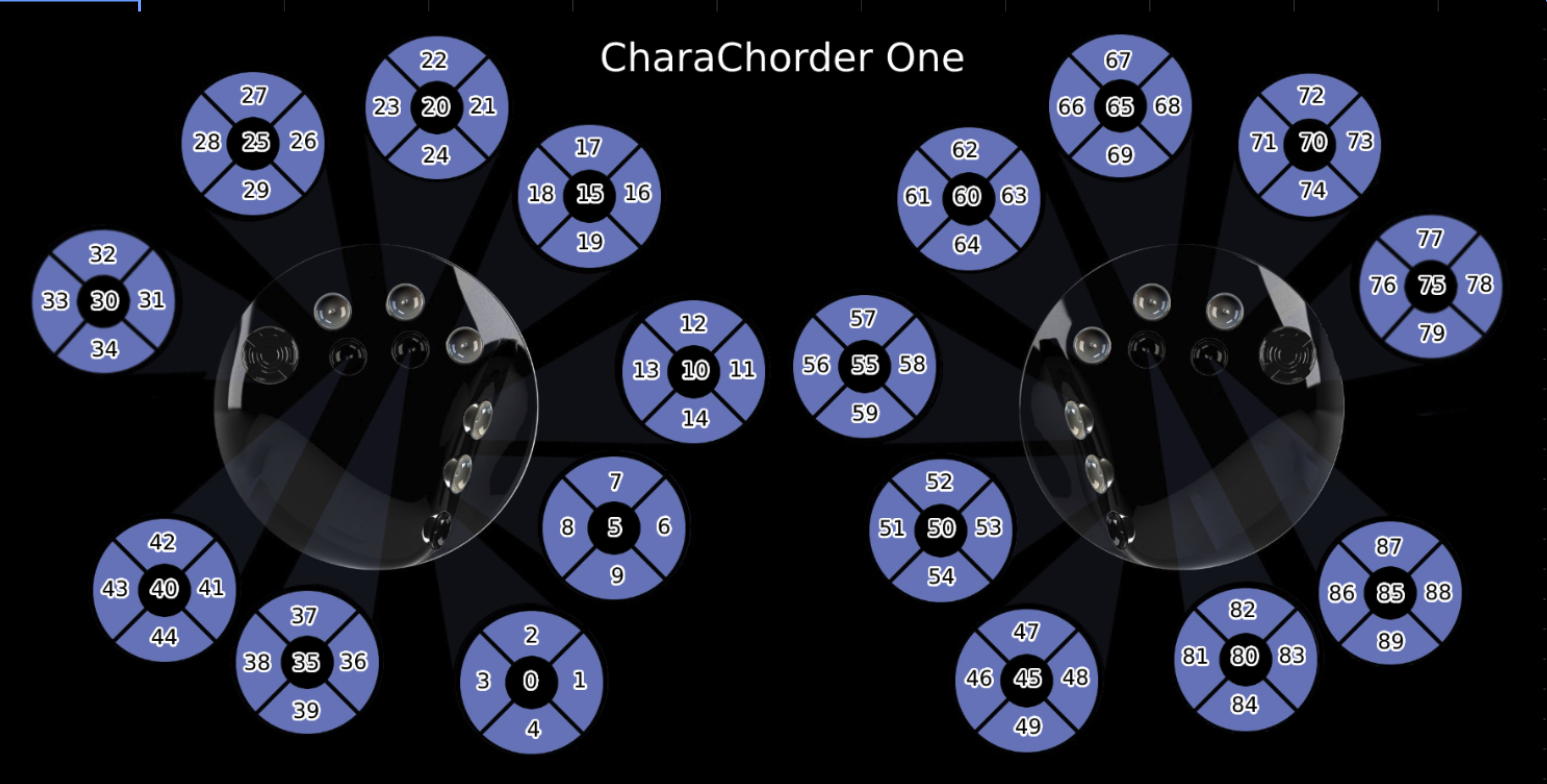
CharaChorder One switch indices. Each 5-way switch is shown as its center (press) index surrounded by its north/west/east/south indices.¶
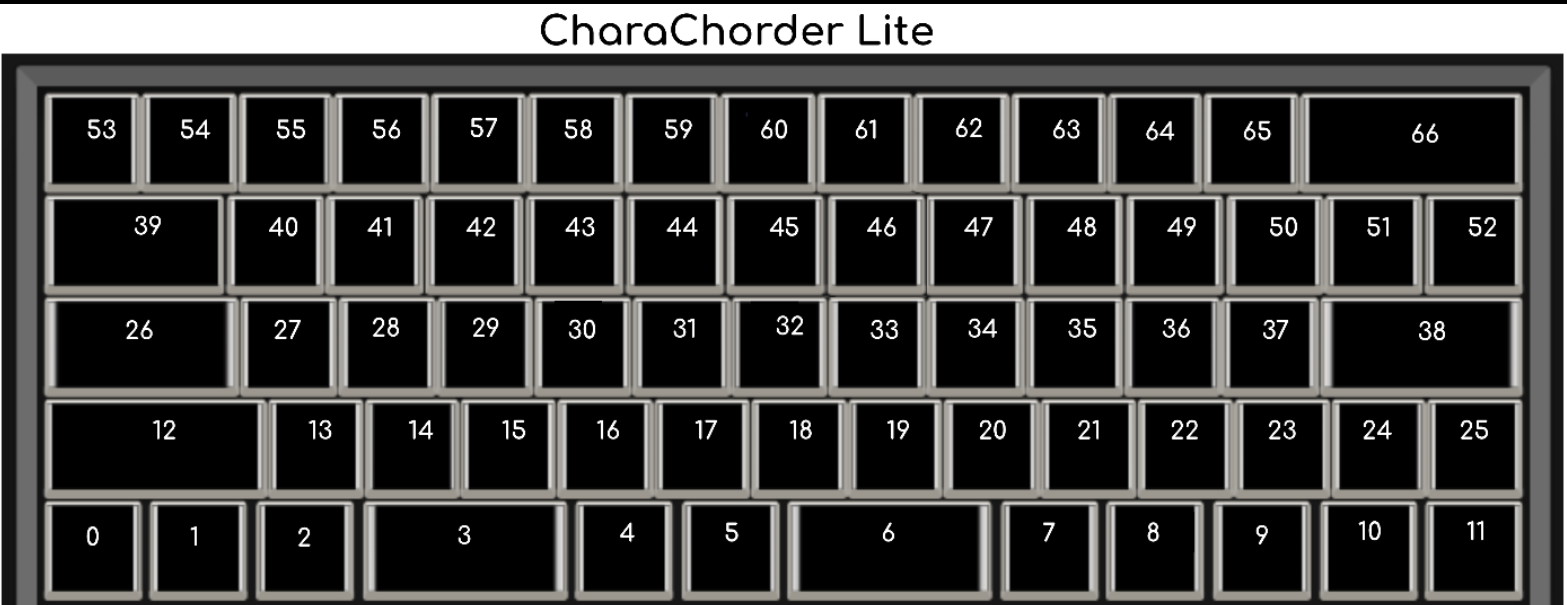
CharaChorder Lite switch indices, in physical key position.¶
Parameter codes¶
Parameter |
Hexadecimal Code |
Description |
|---|---|---|
keyboard/enable |
0x11 |
Range 0 to 1. Default 1. |
keyboard/command control swap |
0x13 |
Swaps CTRL and ⌘ to make transitioning between Mac and other systems easier. Range 0 to 1. Default 0. |
keyboard/debounce press |
0x15 |
Range 0 ms to 255 ms. Default 16 ms. |
keyboard/debounce release |
0x16 |
Range 0 ms to 255 ms. Default 16 ms. |
keyboard/rollover |
0x17 |
How many keys can be held at once and still be detected by your PC, excluding modifier keys. Older hardware or especially BIOS/UEFI might only support 6-key rollover. This only affects reporting to the host system, CCOS always uses full n-key-rollover. Requires a replug to be effective. One of: 6 key, 12 key, 18 key. Default 12 key. |
fuzzy modifiers/enable |
0x18 |
Range 0 ms to 1 ms. Default 0 ms. |
fuzzy modifiers/press theshold |
0x19 |
The time between a modifier press and the previous key press. Range 0 ms to 255 ms. Default 50 ms. |
fuzzy modifiers/release theshold |
0x1A |
The time between a modifier release and the previous key press. Range 0 ms to 255 ms. Default 110 ms. |
fuzzy modifiers/release guard threshold |
0x1B |
The time between a modifier press and a subsequent key press that prevents the next modifier release from affecting it. Range 0 ms to 255 ms. Default 50 ms. |
mouse/enable |
0x21 |
Range 0 to 1. Default 1. |
mouse/slow speed |
0x22 |
Range 0 px to 255 px. Default 50 px. |
mouse/fast speed |
0x23 |
Range 0 px to 2550 px, in steps of 10 px. Default 250 px. |
mouse/caffeine |
0x24 |
Keeps computer alive by moving the mouse back and forth one pixel every 60s. Range 0 to 1. Default 0. |
mouse/scroll speed |
0x25 |
Range 0 pg to 255 pg. Default 2 pg. |
mouse/scroll throttle |
0x27 |
Windows struggles to process fast scrolling. Range 0 ms to 255 ms. Default 16 ms. |
chording/enable |
0x31 |
Range 0 to 1. Default 1. |
chording/press tolerance |
0x34 |
Scales with the number of chord inputs. Range 0 ms to 255 ms. Default 30 ms. |
chording/release tolerance |
0x35 |
Scales with the number of chord inputs. Range 0 ms to 255 ms. Default 25 ms. |
autocorrect/maximum attempts |
0x36 |
Set to 0 to turn off autocorrect. An attempt is every stroke from the first keypress to the next full release. Recommended to turn off when you are comfortable using Quickfix. Range 0 to 255. Default 10. |
autocorrect/timeout |
0x37 |
Range 0 s to 25.5 s, in steps of 0.1 s. Default 8 s. |
chording/minimum chord keys |
0x38 |
A minimum chord key count of 1 can very slightly affect typing latency. Range 1 to 12. Default 2. |
chording/tap dance tolerance |
0x39 |
Range 0 to 1275, in steps of 5. Default 175. |
chording/concatenation style |
0x3E |
Appended (classic) places spaces directly after a chord. Recommended for typists. Prepended places spaces lazily between two chords. Recommended for text editing and coding. One of: appended, prepended. Default appended. |
chording/detection method |
0x3F |
In latency (classic) mode each key is printed instantly and backspaced after a successful chord. Smart adds a small amount of latency depending on your tolerances, and only prints characters when it is no longer plausible for the inputs to be a chord input. Continuous (spurring) and allows you to jump from one chord to the next without releasing all keys, with more potential speed traded against the flexibility of character entry. One of: latency, smart, continuous. Default latency. |
arpeggiates/enable |
0x51 |
Range 0 to 1. Default 1. |
arpeggiates/timeout |
0x54 |
Range 0 ms to 2550 ms, in steps of 10 ms. Default 1200 ms. |
arpeggiates/mode |
0x55 |
One of: all, chord modifiers, arpeggiate chords. Default all. |
chording/compound timeout |
0x64 |
Range 0 ms to 2550 ms, in steps of 10 ms. Default 1000 ms. |
gaming/layer warp |
0x70 |
Re-press held keys with new layer mappings when switching layers. Range 0 to 1. Default 0. |
leds/hue |
0x81 |
Range 0 to 65280, in steps of 256. Default 0. CharaChorder Lite, Master Forge only. |
leds/saturation |
0x82 |
Range 0 to 255. Default 255. CharaChorder Lite, Master Forge only. |
leds/brightness |
0x83 |
Range 0 to 255. Default 255. CharaChorder Lite, Master Forge only. |
leds/enable |
0x84 |
Range 0 to 1. Default 1. CharaChorder Lite, Master Forge only. |
leds/effect |
0x85 |
One of: static, rainbow. Default rainbow. CharaChorder Lite, Master Forge only. |
leds/effect cycle |
0x86 |
Range 0.1 s to 25.5 s, in steps of 0.1 s. Default 25 s. CharaChorder Lite, Master Forge only. |
leds/on off transition |
0x88 |
Range 0 ms to 2550 ms, in steps of 10 ms. Default 1000 ms. CharaChorder Lite, Master Forge only. |
leds/off delay |
0x89 |
Range 0 ms to 2550 ms, in steps of 10 ms. Default 1000 ms. CharaChorder Lite, Master Forge only. |
misc/operating system |
0x91 |
One of: windows, mac, linux, ios, android. Default windows. |
misc/realtime feedback |
0x92 |
Range 0 to 1. Default 1. |
usb/aggressive reporting throttle |
0x93 |
Range 0 s to 25.5 s, in steps of 0.1 s. Default 0 s. |
usb/poll rate |
0x94 |
Requires a replug to be effective. One of: 1000Hz, 500Hz, 250Hz, 125Hz. Default 1000Hz. |
usb/aggressive reporting |
0x95 |
Some hardware combinations, especially with USB hubs, might cause the host to timeout waiting for responses. Enabling this setting will cause the device to always respond with the last report. One of: never, active only. Default never. |
usb/hid resend throttle |
0x97 |
Range 10 ms to 2550 ms, in steps of 10 ms. Default 10 ms. |
ccx/uart pass |
0xC1 |
Range 0 to 1. Default 0. CharaChorder X, CharaChorder Engine only. |
Note
Every code in this table addresses profile A. Profile B’s copy of a
parameter is at id + 0x100, and profile C’s is at id + 0x200 – for
example, parameter 0x15 in profile B is addressed as 0x115, and in
profile C as 0x215. See profiles.
Confirmed on hardware (2026-08, CCOS 3.0.0): writing to 0x115 with
CMD_VAR_SET_PARAMETER changes what CMD_VAR_GET_PARAMETER reads back
from 0x115, while 0x15 and 0x215 are unaffected.
Serial output toggles¶
Code |
Name |
|---|---|
0x01 |
Enable Serial Header |
0x02 |
Enable Serial Logging |
0x03 |
Enable Serial Debugging |
0x04 |
Enable Serial Raw |
0x05 |
Enable Serial Chord |
0x06 |
Enable Serial Keyboard |
0x07 |
Enable Serial Mouse |
0x12 |
Enable Character Entry |
Note
These eight switch serial output on and off rather than change a device setting, so the Firmware Meta API does not publish them and this table stays hand-written.
Confirmed on hardware (2026-08, CCOS 3.0.0): all eight still answer CMD_VAR_GET_PARAMETER, and all default to 0, consistent with the “enable” names above. None of the eight codes has been reassigned to a setting the Meta API currently publishes, unlike some other codes from the same era. The names predate this check and have only been confirmed to the extent of that default value, not by toggling each one and observing the resulting serial output.
Operating system codes¶
Operating System Codes |
Code |
|---|---|
Windows |
0 |
Mac |
1 |
Linux |
2 |
iOS |
3 |
Android |
4 |
Note
Codes 0 to 4 are the positions of the values in the misc/operating system enum, which the Firmware Meta API spells in lower case: windows, mac, linux, ios, android.
This table used to list Unknown at code 255 as well. Tested on hardware (2026-08): writing 255 to parameter 0x91 with CMD_VAR_SET_PARAMETER and reading it back with CMD_VAR_GET_PARAMETER returns 5, not 255 — the value does not round-trip, so the firmware does not actually store 255 for this setting. The row was removed.
CMD_VAR_COMMIT¶
I/O |
Index |
Name |
Type |
Example |
Notes |
|---|---|---|---|---|---|
INPUT |
0 |
Command |
Chars |
VAR |
|
INPUT |
1 |
SubCommand |
Hexadecimal VAR Code |
B0 |
Commit parameters to memory |
OUTPUT |
0 |
Command |
Chars |
VAR |
|
OUTPUT |
1 |
SubCommand |
Hexadecimal VAR Code |
B0 |
|
OUTPUT |
2 |
Success |
Boolean Number |
0 |
This will be 0 on success, or greater than zero for an error if there was a problem committing |
Example(s):
> VAR B0
VAR B0 1
CMD_VAR_GET_PARAMETER¶
I/O |
Index |
Name |
Type |
Example |
Notes |
|---|---|---|---|---|---|
INPUT |
0 |
Command |
Chars |
VAR |
|
INPUT |
1 |
SubCommand |
Hexadecimal VAR Code |
B1 |
Get parameter value |
INPUT |
2 |
Parameter Code |
Hexadecimal Parameter Code |
0x15 |
|
OUTPUT |
0 |
Command |
Chars |
VAR |
|
OUTPUT |
1 |
SubCommand |
Hexadecimal VAR Code |
B1 |
|
OUTPUT |
2 |
Parameter Code |
Hexadecimal Parameter Code |
0x15 |
|
OUTPUT |
3 |
Data Out |
Decimal Number |
7 |
|
OUTPUT |
4 |
Success |
Boolean Number |
0 |
This will be 0 on success, or greater than zero for an error if the VAR Code or Parameter Code doesn’t exist |
Example(s):
> VAR B1 0x15
VAR B1 0x15 7 0
CMD_VAR_SET_PARAMETER¶
I/O |
Index |
Name |
Type |
Example |
Notes |
|---|---|---|---|---|---|
INPUT |
0 |
Command |
Chars |
VAR |
|
INPUT |
1 |
SubCommand |
Hexadecimal VAR Code |
B2 |
Set parameter value |
INPUT |
2 |
Parameter Code |
Hexadecimal Parameter Code |
0x15 |
|
INPUT |
3 |
Data In |
Decimal Number |
17 |
|
OUTPUT |
0 |
Command |
Chars |
VAR |
|
OUTPUT |
1 |
SubCommand |
Hexadecimal VAR Code |
B2 |
|
OUTPUT |
2 |
Parameter Code |
Hexadecimal Parameter Code |
0x15 |
|
OUTPUT |
3 |
Data Out |
Decimal Number |
17 |
This will be a 00 (double zero) if the VAR Code or Parameter Code doesn’t exist or the input value is out of range |
OUTPUT |
4 |
Success |
Boolean Number |
0 |
This will be 0 on success, or greater than zero for an error if there was a problem |
Example(s):
> VAR B2 0x15 17
VAR B2 0x15 17 0
CMD_VAR_GET_KEYMAP¶
I/O |
Index |
Name |
Type |
Example |
Notes |
|---|---|---|---|---|---|
INPUT |
0 |
Command |
Chars |
VAR |
|
INPUT |
1 |
SubCommand |
Hexadecimal VAR Code |
B3 |
Get keymap parameter value |
INPUT |
2 |
Keymap |
Hexadecimal Keymap Code |
A1 |
|
INPUT |
3 |
Index |
Decimal Number |
24 |
For CC1, 0-89 are valid. For CCL, 0-66 are valid. |
OUTPUT |
0 |
Command |
Chars |
VAR |
|
OUTPUT |
1 |
SubCommand |
Hexadecimal VAR Code |
B3 |
|
OUTPUT |
2 |
Keymap |
Hexadecimal Keymap Code |
A1 |
|
OUTPUT |
3 |
Index |
Decimal Number |
24 |
|
OUTPUT |
4 |
Action Id |
Decimal Number |
111 |
Valid action Ids range from 8 thru 2047. |
OUTPUT |
5 |
Success |
Boolean Number |
0 |
This will be 0 on success, or greater than zero for an error if either the Keymap Code or Index are out of range. |
Example(s):
> VAR B3 A1 24
VAR B3 A1 24 111 0
CMD_VAR_SET_KEYMAP¶
I/O |
Index |
Name |
Type |
Example |
Notes |
|---|---|---|---|---|---|
INPUT |
0 |
Command |
Chars |
VAR |
|
INPUT |
1 |
SubCommand |
Hexadecimal VAR Code |
B4 |
Set keymap parameter value |
INPUT |
2 |
Keymap |
Hexadecimal Keymap Code |
A1 |
|
INPUT |
3 |
Index |
Decimal Number |
24 |
For CC1, 0-89 are valid. For CCL, 0-66 are |
INPUT |
4 |
Action Id |
Decimal Number |
112 |
Valid action Ids range from 8 thru 2047. |
OUTPUT |
0 |
Command |
Chars |
VAR |
|
OUTPUT |
1 |
SubCommand |
Hexadecimal VAR Code |
B4 |
|
OUTPUT |
2 |
Keymap |
Hexadecimal Keymap Code |
A0 |
|
OUTPUT |
3 |
Index |
Decimal Number |
24 |
|
OUTPUT |
4 |
Action Id |
Decimal Number |
112 |
Valid action Ids range from 8 thru 2047. Returns a 00 if either the Keymap Code or Index or Action Id are out of range. |
OUTPUT |
5 |
Success |
Boolean Number |
0 |
This will be 0 on success, or greater than zero for an error if the chordmap did not exist or the deletion was unsuccessful |
Example(s):
> VAR B4 A0 24 112
VAR B4 A0 24 112 0
RST¶
The RST command restarts the CCOS device. This will most likely also break the current Serial connection, and a new connection will need to be made. If the COMMIT command has not been called before a RESTART command, then the device will revert to the last settings stored in the non-volatile memory.
I/O |
Index |
Name |
Type |
Example |
Notes |
|---|---|---|---|---|---|
INPUT |
0 |
Command |
Chars |
RST |
|
OUTPUT |
0 |
Command |
Chars |
RST |
Without optional command, this just restarts the device |
OUTPUT |
1 |
SubCommand |
Chars |
BOOTLOADER |
See full list of subcommands below |
OUTPUT |
2 |
Success |
Boolean Number |
0 |
This will be 0 on success, or greater than zero for an error if the subcommand did not exist or the subcommand was unsuccessful |
RST SubCommands¶
RST SubCommand |
Notes |
|---|---|
RESTART |
Restarts the microcontroller. |
FACTORY |
Performs a factory reset of the flash and emulated eeprom. During the process, the flash chip is erased. |
BOOTLOADER |
Restarts the device into a bootloader mode. On a CC1 or CCL M0, the device may be stuck in UF2 bootloader mode until a UF2 file is pasted into the mass storage device. You can copy and paste the UF2 file already in the mass storage device. |
PARAMS |
Resets the parameters to factory defaults and commits. |
KEYMAPS |
Resets the keymaps to the factory defaults and commits. |
STARTER |
Adds starter chordmaps. This does not clear the chordmap library, but adds to it, replacing those that have the same chord. |
CLEARCML |
Permanently deletes all the chordmaps stored in the device memory. |
UPGRADECML |
Attempts to upgrade chordmaps that the system detects are older. This is under development. |
FUNC |
Adds back in functional chords such as CAPSLOCK and Backspace-X chords. |
RAM¶
The RAM command returns the current number of bytes available in SRAM. This is useful for debugging when there is a suspected heap or stack issue.
I/O |
Index |
Name |
Type |
Example |
Notes |
|---|---|---|---|---|---|
INPUT |
0 |
Command |
Chars |
RAM |
|
OUTPUT |
0 |
Command |
Chars |
RAM |
|
OUTPUT |
1 |
Bytes Available |
Decimal |
425 |
Example(s):
> RAM
RAM 425
SIM¶
The SIM command provides a way to inject a chord or key states to be processed by the device. This is primarily used for debugging.
I/O |
Index |
Name |
Type |
Example |
Notes |
|---|---|---|---|---|---|
INPUT |
0 |
Command |
Chars |
SIM |
|
INPUT |
1 |
SubCommand |
Chars |
CHORD |
CHORD or KEYSTATE; may change this to Hexadecimal codes |
INPUT |
2 |
Data In |
Hexadecimal Number |
001946418C0000000000000000000000 |
Chords should be 32 characters |
OUTPUT |
0 |
Command |
Chars |
SIM |
|
OUTPUT |
1 |
SubCommand |
Chars |
CHORD |
|
OUTPUT |
2 |
Data In |
Hexadecimal Number |
001946418C0000000000000000000000 |
|
OUTPUT |
3 |
Data Out |
Hexadecimal CCActionCodes List |
6361727065206469656D |
carpe diem |
Example(s):
> SIM CHORD 001946418C0000000000000000000000
SIM CHORD 001946418C0000000000000000000000 6361727065206469656D
> SIM CHORD 00000000E4E2B0160F84B20ACE7638C0
SIM CHORD 00000000E4E2B0160F84B20ACE7638C0 0 # Returns a 0 if there is no chordmap in the library
Chord Construction¶
There are 128-bits in a chord. The first 8 bits will typically be 0x00, as this byte value is used to store an index value for chordmaps where the chord output is longer than what can be stored in memory in a single chordmap, which has 192 bytes allocated per memory entry.
The next 120-bit bits are segmented into twelve 10-bit chunks. Each 10-bit value is a 10-bit CC action code. While CC action codes can reference up to 13-bits, only up to 10-bit values can be used for key inputs. The key inputs for a chord are sorted in descending order from greatest in value to least in value.
Chain Index |
Key 1 |
Key 2 |
Key 3 |
Key 4 |
Key 5 |
Key 6 |
Key 7 |
Key 8 |
Key 9 |
Key 10 |
Key 11 |
Key 12 |
|
|---|---|---|---|---|---|---|---|---|---|---|---|---|---|
bits |
8 bits |
10 bits |
10 bits |
10 bits |
10 bits |
10 bits |
10 bits |
10 bits |
10 bits |
10 bits |
10 bits |
10 bits |
10 bits |
example 1 |
0 |
w |
r |
o |
l |
d |
|||||||
decimal 1 |
0 |
119 |
114 |
111 |
108 |
100 |
0 |
0 |
0 |
0 |
0 |
0 |
0 |
example 2 |
0 |
DUP |
t |
m |
|||||||||
decimal 2 |
0 |
536 |
116 |
109 |
0 |
0 |
0 |
0 |
0 |
0 |
0 |
0 |
0 |
Note that yes it is possible to use the same CC action code multiple times for keys in a chord, but these chords cannot be activated unless the device’s keymap has more than one instance of the same CC action code assigned to more than one of the keys on the A1 keymap layer.
If a chord is attempted to be formed by more than 12 keys, then the smallest key values after being sorted should be truncated to just 12 values. This chord bit structure can not support more than twelve 10-bit keys. Most chords will have trailing zeros.
To use these chords with the Serial API, they should be converted to a 16-character hexadecimal representation.
Action codes¶
Every CC action code published by the firmware, grouped by category. Chords store these as decimal values; see Chord Construction.
Keyboard
Code |
Hex |
ID |
Description |
|---|---|---|---|
127 |
0x7F |
DEL |
Delete |
296 |
0x128 |
ENTER |
Keyboard Return (US English) |
297 |
0x129 |
ESC |
Keyboard Escape (US English) |
298 |
0x12A |
BKSP |
Keyboard Backspace (US English) |
299 |
0x12B |
TAB |
Keyboard Tab (US English) |
330 |
0x14A |
HOME |
Keyboard Home |
331 |
0x14B |
PGUP |
Keyboard Page Up |
333 |
0x14D |
END |
Keyboard End |
334 |
0x14E |
PGDN |
Keyboard Page Down |
335 |
0x14F |
ARROW_RT |
Keyboard Right Arrow |
336 |
0x150 |
ARROW_LF |
Keyboard Left Arrow |
337 |
0x151 |
ARROW_DN |
Keyboard Down Arrow |
338 |
0x152 |
ARROW_UP |
Keyboard Up Arrow |
533 |
0x215 |
DUP_RIGHT |
Repeat Last Note |
535 |
0x217 |
DUP_ALL |
Repeat the last note, including non-printable characters |
536 |
0x218 |
DUP |
Repeat Last Note |
Modifiers
Code |
Hex |
ID |
Description |
|---|---|---|---|
313 |
0x139 |
CAPSLOCK |
Caps Lock |
512 |
0x200 |
LEFT_CTRL |
Control Modifier |
513 |
0x201 |
LEFT_SHIFT |
Shift Modifier |
514 |
0x202 |
LEFT_ALT |
Alt Modifier |
515 |
0x203 |
LEFT_GUI |
GUI/Windows/Super Modifier |
516 |
0x204 |
RIGHT_CTRL |
Control Modifier |
517 |
0x205 |
RIGHT_SHIFT |
Shift Modifier |
518 |
0x206 |
RIGHT_ALT |
Alt Modifier |
519 |
0x207 |
RIGHT_GUI |
GUI/Windows/Super Modifier |
540 |
0x21C |
AMBILEFT |
Ambidextrous Throwover |
542 |
0x21E |
AMBIRIGHT |
Ambidextrous Throwover |
548 |
0x224 |
KM_1_L |
Primary Layer |
549 |
0x225 |
KM_1_R |
Primary Layer |
550 |
0x226 |
KM_2_L |
Numeric Layer |
551 |
0x227 |
KM_2_R |
Numeric Layer |
552 |
0x228 |
KM_3_L |
Function Layer |
553 |
0x229 |
KM_3_R |
Function Layer |
554 |
0x22A |
KM_4_L |
Flag Layer |
555 |
0x22B |
KM_4_R |
Flag Layer |
650 |
0x28A |
PROFILE_A |
Profile A |
651 |
0x28B |
PROFILE_B |
Profile B |
652 |
0x28C |
PROFILE_C |
Profile C |
F-Keys
Code |
Hex |
ID |
Description |
|---|---|---|---|
314 |
0x13A |
F1 |
Keyboard F1 |
315 |
0x13B |
F2 |
Keyboard F2 |
316 |
0x13C |
F3 |
Keyboard F3 |
317 |
0x13D |
F4 |
Keyboard F4 |
318 |
0x13E |
F5 |
Keyboard F5 |
319 |
0x13F |
F6 |
Keyboard F6 |
320 |
0x140 |
F7 |
Keyboard F7 |
321 |
0x141 |
F8 |
Keyboard F8 |
322 |
0x142 |
F9 |
Keyboard F9 |
323 |
0x143 |
F10 |
Keyboard F10 |
324 |
0x144 |
F11 |
Keyboard F11 |
325 |
0x145 |
F12 |
Keyboard F12 |
360 |
0x168 |
F13 |
Keyboard F13 |
361 |
0x169 |
F14 |
Keyboard F14 |
362 |
0x16A |
F15 |
Keyboard F15 |
363 |
0x16B |
F16 |
Keyboard F16 |
364 |
0x16C |
F17 |
Keyboard F17 |
365 |
0x16D |
F18 |
Keyboard F18 |
366 |
0x16E |
F19 |
Keyboard F19 |
367 |
0x16F |
F20 |
Keyboard F20 |
368 |
0x170 |
F21 |
Keyboard F21 |
369 |
0x171 |
F22 |
Keyboard F22 |
370 |
0x172 |
F23 |
Keyboard F23 |
371 |
0x173 |
F24 |
Keyboard F24 |
Mouse
Mouse Actions
Code |
Hex |
ID |
Description |
|---|---|---|---|
560 |
0x230 |
MS_CLICK_BWD |
Mouse Backward Button Click |
561 |
0x231 |
MS_CLICK_FWD |
Mouse Forward Button Click |
562 |
0x232 |
MS_CLICK_LF |
Mouse Left Click |
563 |
0x233 |
MS_CLICK_RT |
Mouse Right Click |
564 |
0x234 |
MS_CLICK_MD |
Mouse Middle Click |
565 |
0x235 |
MS_MOVE_RT |
Mouse Move Right |
566 |
0x236 |
MS_MOVE_LF |
Mouse Move Left |
567 |
0x237 |
MS_MOVE_DN |
Mouse Move Down |
568 |
0x238 |
MS_MOVE_UP |
Mouse Move Up |
569 |
0x239 |
MS_SCRL_RT |
Mouse Scroll Right |
570 |
0x23A |
MS_SCRL_LF |
Mouse Scroll Left |
571 |
0x23B |
MS_SCRL_DN |
Mouse Scroll Down |
572 |
0x23C |
MS_SCRL_UP |
Mouse Scroll Up |
589 |
0x24D |
MS_SPIN_SCRL_H_1 |
Spin Pan North |
590 |
0x24E |
MS_SPIN_SCRL_H_2 |
Spin Pan East |
591 |
0x24F |
MS_SPIN_SCRL_H_3 |
Spin Pan South |
592 |
0x250 |
MS_SPIN_SCRL_H_4 |
Spin Pan West |
593 |
0x251 |
MS_SPIN_SCRL_V_1 |
Spin Scroll North |
594 |
0x252 |
MS_SPIN_SCRL_V_2 |
Spin Scroll East |
595 |
0x253 |
MS_SPIN_SCRL_V_3 |
Spin Scroll South |
596 |
0x254 |
MS_SPIN_SCRL_V_4 |
Spin Scroll West |
Chording
CharaChorder specific actions
Code |
Hex |
ID |
Description |
|---|---|---|---|
256 |
0x100 |
KSC_00 |
Inhibit Concatenator |
523 |
0x20B |
PRESS_NEXT |
Press and do not release the next key/action |
524 |
0x20C |
RELEASE_NEXT |
Release the next key/action in the sequence |
545 |
0x221 |
HYPERSPACE |
Hyperspace |
547 |
0x223 |
CAPTURE |
Hyperspace Capture |
558 |
0x22E |
HOLD_COMPOUND |
Dynamic Library |
559 |
0x22F |
RELEASE_COMPOUND |
Base Library |
573 |
0x23D |
CAPITALIZE |
Capitalize |
574 |
0x23E |
JOIN |
Join |
575 |
0x23F |
QUICKFIX |
Quickfix |
577 |
0x241 |
DELAY_100 |
Delay 100ms |
578 |
0x242 |
DELAY_10 |
Delay 10ms |
579 |
0x243 |
DELAY_1 |
Delay 1ms |
597 |
0x255 |
DELAY_500 |
Delay 500ms |
598 |
0x256 |
DELAY_1000 |
Delay 1000ms |
1001 |
0x3E9 |
ARPEGGIATE |
Arpeggiate Chord |
1002 |
0x3EA |
TAP_DANCE |
Tap Dance Chord |
Pseudo Actions
These actions don’t do anything, and can be used for single-key chords
Code |
Hex |
ID |
Description |
|---|---|---|---|
600 |
0x258 |
LH_THUMB_3_3D |
Pseudo 01 |
601 |
0x259 |
LH_THUMB_2_3D |
Pseudo 02 |
602 |
0x25A |
LH_THUMB_1_3D |
Pseudo 03 |
603 |
0x25B |
LH_INDEX_3D |
Pseudo 04 |
604 |
0x25C |
LH_MID_1_3D |
Pseudo 05 |
605 |
0x25D |
LH_RING_1_3D |
Pseudo 06 |
606 |
0x25E |
LH_PINKY_3D |
Pseudo 07 |
607 |
0x25F |
LH_MID_2_3D |
Pseudo 08 |
608 |
0x260 |
LH_RING_2_3D |
Pseudo 09 |
609 |
0x261 |
RH_THUMB_3_3D |
Pseudo 10 |
610 |
0x262 |
RH_THUMB_2_3D |
Pseudo 11 |
611 |
0x263 |
RH_THUMB_1_3D |
Pseudo 12 |
612 |
0x264 |
RH_INDEX_3D |
Pseudo 13 |
613 |
0x265 |
RH_MID_1_3D |
Pseudo 14 |
614 |
0x266 |
RH_RING_1_3D |
Pseudo 15 |
615 |
0x267 |
RH_PINKY_3D |
Pseudo 16 |
616 |
0x268 |
RH_MID_2_3D |
Pseudo 17 |
617 |
0x269 |
RH_RING_2_3D |
Pseudo 18 |
International
Macros for the US-Intl. layout. Exact mappings may vary depending on the system and specific variation of the layout.
Code |
Hex |
ID |
Description |
|---|---|---|---|
700 |
0x2BC |
ALT_R_SPACE |
SPACE + AltGr |
701 |
0x2BD |
¡ |
1 + Shift + AltGr |
702 |
0x2BE |
DEAD_DIAERESIS |
Quote + Shift + AltGr |
703 |
0x2BF |
DEAD_MACRON |
3 + Shift + AltGr |
704 |
0x2C0 |
£ |
1 + Shift + AltGr |
705 |
0x2C1 |
DEAD_CEDILLA |
5 + Shift + AltGr |
706 |
0x2C2 |
½ |
7 + Shift + AltGr |
707 |
0x2C3 |
DEAD_ACUTE |
Quote + AltGr |
708 |
0x2C4 |
DEAD_BREVE |
9 + Shift + AltGr |
709 |
0x2C5 |
DEAD_OVERRING |
0 + Shift + AltGr |
710 |
0x2C6 |
¾ |
8 + Shift + AltGr |
711 |
0x2C7 |
÷ |
Equal + Shift + AltGr |
712 |
0x2C8 |
ç |
Comma + AltGr |
713 |
0x2C9 |
¥ |
Minus + AltGr |
714 |
0x2CA |
DEAD_OVERDOT |
Period + AltGr |
715 |
0x2CB |
¿ |
Slash + AltGr |
716 |
0x2CC |
’ |
0 + AltGr |
717 |
0x2CD |
¹ |
1 + AltGr |
718 |
0x2CE |
² |
2 + AltGr |
719 |
0x2CF |
³ |
3 + AltGr |
720 |
0x2D0 |
¤ |
4 + AltGr |
721 |
0x2D1 |
€ |
5 + AltGr |
722 |
0x2D2 |
DEAD_CARET |
6 + AltGr |
723 |
0x2D3 |
DEAD_DOUBLE_QUOTE |
7 + AltGr |
724 |
0x2D4 |
DEAD_HOOK_RIGHT |
8 + AltGr |
725 |
0x2D5 |
‘ |
9 + AltGr |
726 |
0x2D6 |
° |
Semicolon + Shift + AltGr |
727 |
0x2D7 |
¶ |
Semicolon + AltGr |
728 |
0x2D8 |
Ç |
Comma + Shift + AltGr |
729 |
0x2D9 |
× |
Equals + AltGr |
730 |
0x2DA |
DEAD_CARON |
Period + Shift + AltGr |
731 |
0x2DB |
DEAD_HOOK_ABOVE |
Slash + Shift + AltGr |
732 |
0x2DC |
ALT_R_SHIFT_2 |
2 + Shift + AltGr |
733 |
0x2DD |
Á |
a + Shift + AltGr |
734 |
0x2DE |
DEAD_SLASH |
b + Shift + AltGr |
735 |
0x2DF |
¢ |
c + Shift + AltGr |
736 |
0x2E0 |
Ð |
d + Shift + AltGr |
737 |
0x2E1 |
É |
e + Shift + AltGr |
738 |
0x2E2 |
ALT_R_SHIFT_F |
f + Shift + AltGr |
739 |
0x2E3 |
ALT_R_SHIFT_G |
g + Shift + AltGr |
740 |
0x2E4 |
ALT_R_SHIFT_H |
h + Shift + AltGr |
741 |
0x2E5 |
Í |
i + Shift + AltGr |
742 |
0x2E6 |
Ï |
j + Shift + AltGr |
743 |
0x2E7 |
Π|
k + Shift + AltGr |
744 |
0x2E8 |
Ø |
l + Shift + AltGr |
745 |
0x2E9 |
± |
m + Shift + AltGr |
746 |
0x2EA |
Ñ |
n + Shift + AltGr |
747 |
0x2EB |
Ó |
o + Shift + AltGr |
748 |
0x2EC |
Ö |
p + Shift + AltGr |
749 |
0x2ED |
Ä |
q + Shift + AltGr |
750 |
0x2EE |
Ë |
r + Shift + AltGr |
751 |
0x2EF |
§ |
s + Shift + AltGr |
752 |
0x2F0 |
Þ |
t + Shift + AltGr |
753 |
0x2F1 |
Ú |
u + Shift + AltGr |
754 |
0x2F2 |
™ |
v + Shift + AltGr |
755 |
0x2F3 |
Å |
w + Shift + AltGr |
756 |
0x2F4 |
ALT_R_SHIFT_X |
x + Shift + AltGr |
757 |
0x2F5 |
Ü |
y + Shift + AltGr |
758 |
0x2F6 |
Æ |
z + Shift + AltGr |
759 |
0x2F7 |
« |
Left Bracket + AltGr |
760 |
0x2F8 |
¬ |
Backslash + AltGr |
761 |
0x2F9 |
» |
Right Bracket + AltGr |
762 |
0x2FA |
¼ |
6 + Shift + AltGr |
763 |
0x2FB |
DEAD_UNDERDOT |
Minus + Shift + AltGr |
764 |
0x2FC |
DEAD_GRAVE |
Grave + AltGr |
765 |
0x2FD |
á |
a + AltGr |
766 |
0x2FE |
· |
b + AltGr |
767 |
0x2FF |
© |
c + AltGr |
768 |
0x300 |
ð |
d + AltGr |
769 |
0x301 |
é |
e + AltGr |
770 |
0x302 |
ALT_R_f |
f + AltGr |
771 |
0x303 |
ALT_R_g |
g + AltGr |
772 |
0x304 |
ALT_R_h |
h + AltGr |
773 |
0x305 |
í |
i + AltGr |
774 |
0x306 |
ï |
j + AltGr |
775 |
0x307 |
œ |
k + AltGr |
776 |
0x308 |
ø |
l + AltGr |
777 |
0x309 |
µ |
m + AltGr |
778 |
0x30A |
ñ |
n + AltGr |
779 |
0x30B |
ó |
o + AltGr |
780 |
0x30C |
ö |
p + AltGr |
781 |
0x30D |
ä |
q + AltGr |
782 |
0x30E |
ë |
r + AltGr |
783 |
0x30F |
ß |
s + AltGr |
784 |
0x310 |
þ |
t + AltGr |
785 |
0x311 |
ú |
u + AltGr |
786 |
0x312 |
® |
v + AltGr |
787 |
0x313 |
å |
w + AltGr |
788 |
0x314 |
ALT_R_X |
x + AltGr |
789 |
0x315 |
ü |
y + AltGr |
790 |
0x316 |
æ |
z + AltGr |
791 |
0x317 |
“ |
Left Bracket + Shift + AltGr |
792 |
0x318 |
¦ |
Backslash + Shift + AltGr |
793 |
0x319 |
” |
Right Bracket + Shift + AltGr |
794 |
0x31A |
DEAD_TILDE |
Grave + Shift + AltGr |
795 |
0x31B |
ALT_R_DEL |
DEL + AltGr |
798 |
0x31E |
ALT_R_ISO_BACKSLASH |
ISO_BACKSLASH + AltGr |
799 |
0x31F |
SHIFT_ALT_R_ISO_BACKSLASH |
ISO_BACKSLASH + Shift + AltGr |
Modes
Code |
Hex |
ID |
Description |
|---|---|---|---|
531 |
0x213 |
VIM |
VIM Mode |
532 |
0x214 |
GTM |
GTM Toggle |
534 |
0x216 |
IMPULSE |
Impulse Toggle |
538 |
0x21A |
SPUR |
Spurring Toggle |
576 |
0x240 |
ACTIVE_QUICKFIX |
Active Quickfix |
Windows Alt Codes
Special characters that can be inserted on Windows by holding ALT and typing a code on the Numpad.
Code |
Hex |
ID |
Description |
|---|---|---|---|
128 |
0x80 |
€ (Windows Alt Code) |
Uppercase cedilla |
129 |
0x81 |
HOP |
HOP (High Octet Preset) |
130 |
0x82 |
‚ |
Single Low-9 Quotation Mark |
131 |
0x83 |
ƒ |
Latin Small Letter f with Hook; Florin |
132 |
0x84 |
„ |
Double Low-9 Quotation Mark |
133 |
0x85 |
… |
Horizontal Ellipsis |
134 |
0x86 |
† |
Dagger |
135 |
0x87 |
‡ |
Double Dagger |
136 |
0x88 |
ˆ |
Circumflex |
137 |
0x89 |
‰ |
Per Mile |
138 |
0x8A |
Š |
Captial S Caron |
139 |
0x8B |
‹ |
Left Guillemet |
140 |
0x8C |
Π(Windows Alt Code) |
Captial Ligature OE |
141 |
0x8D |
— |
RI (Reverse Index) |
142 |
0x8E |
Ž |
Captial Z Caron |
143 |
0x8F |
— |
SS3 (Single-Shift G3) |
144 |
0x90 |
— |
DCS (Device Control String) |
145 |
0x91 |
‘ (Windows Alt Code) |
Single Quote Left |
146 |
0x92 |
’ (Windows Alt Code) |
Single Quote Right |
147 |
0x93 |
“ (Windows Alt Code) |
Double Quote Left |
148 |
0x94 |
” (Windows Alt Code) |
Double Quote Right |
149 |
0x95 |
• |
Bullet |
150 |
0x96 |
– |
En Dash |
151 |
0x97 |
— |
Em Dash |
152 |
0x98 |
˜ |
Small Tilde |
153 |
0x99 |
™ (Windows Alt Code) |
Trademark |
154 |
0x9A |
š |
Small s Carson |
155 |
0x9B |
› |
Right Guillement |
156 |
0x9C |
œ (Windows Alt Code) |
Small Ligature oe |
157 |
0x9D |
— |
Operating System Command |
158 |
0x9E |
ž |
Small Z Caron |
159 |
0x9F |
Ÿ |
Capital Y Diaresis |
160 |
0xA0 |
NO_BREAK_SPACE |
No Break Space |
161 |
0xA1 |
¡ (Windows Alt Code) |
Inverted Exclamation |
162 |
0xA2 |
¢ (Windows Alt Code) |
Cent |
163 |
0xA3 |
£ (Windows Alt Code) |
Pound |
164 |
0xA4 |
¤ (Windows Alt Code) |
Currency |
165 |
0xA5 |
¥ (Windows Alt Code) |
Yen |
166 |
0xA6 |
¦ (Windows Alt Code) |
Broken Bar |
167 |
0xA7 |
§ (Windows Alt Code) |
Section |
168 |
0xA8 |
¨ |
Diaresis |
169 |
0xA9 |
© (Windows Alt Code) |
Copyright |
170 |
0xAA |
ª |
Feminine Ordinal |
171 |
0xAB |
« (Windows Alt Code) |
Double Left Guillement |
172 |
0xAC |
¬ (Windows Alt Code) |
Not |
173 |
0xAD |
|
Soft Hyphen |
174 |
0xAE |
® (Windows Alt Code) |
Registered |
175 |
0xAF |
¯ |
Macron |
176 |
0xB0 |
° (Windows Alt Code) |
Degree |
177 |
0xB1 |
± (Windows Alt Code) |
Plus Minus |
178 |
0xB2 |
² (Windows Alt Code) |
Superscript Two |
179 |
0xB3 |
³ (Windows Alt Code) |
Superscript Three |
180 |
0xB4 |
´ |
Acute |
181 |
0xB5 |
µ (Windows Alt Code) |
Micro |
182 |
0xB6 |
¶ (Windows Alt Code) |
Pilcrow |
183 |
0xB7 |
· (Windows Alt Code) |
Middle Dot |
184 |
0xB8 |
¸ |
Cedilla |
185 |
0xB9 |
¹ (Windows Alt Code) |
Superscript One |
186 |
0xBA |
º |
Masculine Ordinal |
187 |
0xBB |
» (Windows Alt Code) |
Double Right Guillement |
188 |
0xBC |
¼ (Windows Alt Code) |
One Quarter Fraction |
189 |
0xBD |
½ (Windows Alt Code) |
One Half Fraction |
190 |
0xBE |
¾ (Windows Alt Code) |
Three Quarters Fraction |
191 |
0xBF |
¿ (Windows Alt Code) |
Inverted Question |
192 |
0xC0 |
À |
Captial A Grave |
193 |
0xC1 |
Á (Windows Alt Code) |
— |
194 |
0xC2 |
 |
— |
195 |
0xC3 |
à |
— |
196 |
0xC4 |
Ä (Windows Alt Code) |
— |
197 |
0xC5 |
Å (Windows Alt Code) |
— |
198 |
0xC6 |
Æ (Windows Alt Code) |
— |
199 |
0xC7 |
Ç (Windows Alt Code) |
— |
200 |
0xC8 |
È |
— |
201 |
0xC9 |
É (Windows Alt Code) |
— |
202 |
0xCA |
Ê |
— |
203 |
0xCB |
Ë (Windows Alt Code) |
— |
204 |
0xCC |
Ì |
— |
205 |
0xCD |
Í (Windows Alt Code) |
— |
206 |
0xCE |
Î |
— |
207 |
0xCF |
Ï (Windows Alt Code) |
— |
208 |
0xD0 |
Ð (Windows Alt Code) |
— |
209 |
0xD1 |
Ñ (Windows Alt Code) |
— |
210 |
0xD2 |
Ò |
— |
211 |
0xD3 |
Ó (Windows Alt Code) |
— |
212 |
0xD4 |
Ô |
— |
213 |
0xD5 |
Õ |
— |
214 |
0xD6 |
Ö (Windows Alt Code) |
— |
215 |
0xD7 |
× (Windows Alt Code) |
— |
216 |
0xD8 |
Ø (Windows Alt Code) |
— |
217 |
0xD9 |
Ù |
— |
218 |
0xDA |
Ú (Windows Alt Code) |
— |
219 |
0xDB |
Û |
— |
220 |
0xDC |
Ü (Windows Alt Code) |
— |
221 |
0xDD |
Ý |
— |
222 |
0xDE |
Þ (Windows Alt Code) |
— |
223 |
0xDF |
ß (Windows Alt Code) |
— |
224 |
0xE0 |
à |
— |
225 |
0xE1 |
á (Windows Alt Code) |
— |
226 |
0xE2 |
â |
— |
227 |
0xE3 |
ã |
— |
228 |
0xE4 |
ä (Windows Alt Code) |
— |
229 |
0xE5 |
å (Windows Alt Code) |
— |
230 |
0xE6 |
æ (Windows Alt Code) |
— |
231 |
0xE7 |
ç (Windows Alt Code) |
— |
232 |
0xE8 |
è |
— |
233 |
0xE9 |
é (Windows Alt Code) |
— |
234 |
0xEA |
ê |
— |
235 |
0xEB |
ë (Windows Alt Code) |
— |
236 |
0xEC |
ì |
— |
237 |
0xED |
í (Windows Alt Code) |
— |
238 |
0xEE |
î |
— |
239 |
0xEF |
ï (Windows Alt Code) |
— |
240 |
0xF0 |
ð (Windows Alt Code) |
— |
241 |
0xF1 |
ñ (Windows Alt Code) |
— |
242 |
0xF2 |
ò |
— |
243 |
0xF3 |
ó (Windows Alt Code) |
— |
244 |
0xF4 |
ô |
— |
245 |
0xF5 |
õ |
— |
246 |
0xF6 |
ö (Windows Alt Code) |
— |
247 |
0xF7 |
÷ (Windows Alt Code) |
— |
248 |
0xF8 |
ø (Windows Alt Code) |
— |
249 |
0xF9 |
ù |
— |
250 |
0xFA |
ú (Windows Alt Code) |
— |
251 |
0xFB |
û |
— |
252 |
0xFC |
ü (Windows Alt Code) |
— |
253 |
0xFD |
ý |
— |
254 |
0xFE |
þ (Windows Alt Code) |
— |
255 |
0xFF |
ÿ |
Small y Diaeresis |
Modifier Macros
Code |
Hex |
ID |
Description |
|---|---|---|---|
525 |
0x20D |
RIGHT_ALT_SHIFT |
AltGr and Shift in one action |
526 |
0x20E |
HYPER |
Hyper key, holds left ctrl, shift, alt and gui |
527 |
0x20F |
MEH |
Meh key, holds left ctrl, shift and alt |
620 |
0x26C |
PRIMARY_SHIFT |
Holds shift with the primary layer |
621 |
0x26D |
PRIMARY_ALT_L |
Holds left alt with the primary layer |
622 |
0x26E |
PRIMARY_ALT_R |
Holds right alt (AltGr) with the primary layer |
623 |
0x26F |
PRIMARY_SHIFT_ALT_R |
Holds shift and right alt (AltGr) with the primary layer |
624 |
0x270 |
PRIMARY_CTRL |
Holds ctrl with the primary layer |
625 |
0x271 |
PRIMARY_GUI |
Holds gui with the primary layer |
626 |
0x272 |
PRIMARY_MEH |
Holds meh with the primary layer |
627 |
0x273 |
PRIMARY_HYPER |
Holds hyper with the primary layer |
630 |
0x276 |
SECONDARY_SHIFT |
Holds shift with the secondary layer |
631 |
0x277 |
SECONDARY_ALT_L |
Holds left alt with the secondary layer |
632 |
0x278 |
SECONDARY_ALT_R |
Holds right alt (AltGr) with the secondary layer |
633 |
0x279 |
SECONDARY_SHIFT_ALT_R |
Holds shift and right alt (AltGr) with the secondary layer |
634 |
0x27A |
SECONDARY_CTRL |
Holds ctrl with the secondary layer |
635 |
0x27B |
SECONDARY_GUI |
Holds gui with the secondary layer |
636 |
0x27C |
SECONDARY_MEH |
Holds meh with the secondary layer |
637 |
0x27D |
SECONDARY_HYPER |
Holds hyper with the secondary layer |
640 |
0x280 |
TERTIARY_SHIFT |
Holds shift with the tertiary layer |
641 |
0x281 |
TERTIARY_ALT_L |
Holds left alt with the tertiary layer |
642 |
0x282 |
TERTIARY_ALT_R |
Holds right alt (AltGr) with the tertiary layer |
643 |
0x283 |
TERTIARY_SHIFT_ALT_R |
Holds shift and right alt (AltGr) with the tertiary layer |
644 |
0x284 |
TERTIARY_CTRL |
Holds ctrl with the tertiary layer |
645 |
0x285 |
TERTIARY_GUI |
Holds gui with the tertiary layer |
646 |
0x286 |
TERTIARY_MEH |
Holds meh with the tertiary layer |
647 |
0x287 |
TERTIARY_HYPER |
Holds hyper with the tertiary layer |
660 |
0x294 |
QUATERNARY_SHIFT |
Holds shift with the tertiary layer |
661 |
0x295 |
QUATERNARY_ALT_L |
Holds left alt with the tertiary layer |
662 |
0x296 |
QUATERNARY_ALT_R |
Holds right alt (AltGr) with the tertiary layer |
663 |
0x297 |
QUATERNARY_SHIFT_ALT_R |
Holds shift and right alt (AltGr) with the tertiary layer |
664 |
0x298 |
QUATERNARY_CTRL |
Holds ctrl with the tertiary layer |
665 |
0x299 |
QUATERNARY_GUI |
Holds gui with the tertiary layer |
666 |
0x29A |
QUATERNARY_MEH |
Holds meh with the tertiary layer |
667 |
0x29B |
QUATERNARY_HYPER |
Holds hyper with the tertiary layer |
ASCII
Code |
Hex |
ID |
Description |
|---|---|---|---|
32 |
0x20 |
SPACE |
— |
39 |
0x27 |
‘ |
Single Quote |
44 |
0x2C |
, |
Comma |
45 |
0x2D |
- |
Minus |
46 |
0x2E |
. |
Period |
47 |
0x2F |
/ |
Forward Slash |
48 |
0x30 |
0 |
Zero |
49 |
0x31 |
1 |
One |
50 |
0x32 |
2 |
Two |
51 |
0x33 |
3 |
Three |
52 |
0x34 |
4 |
Four |
53 |
0x35 |
5 |
Five |
54 |
0x36 |
6 |
Six |
55 |
0x37 |
7 |
Seven |
56 |
0x38 |
8 |
Eight |
57 |
0x39 |
9 |
Nine |
59 |
0x3B |
; |
Semicolon |
61 |
0x3D |
= |
Equals |
91 |
0x5B |
[ |
Left Bracket |
92 |
0x5C |
\ |
Backslash |
93 |
0x5D |
] |
Right Bracket |
96 |
0x60 |
` |
Backtick |
97 |
0x61 |
a |
Lowercase a |
98 |
0x62 |
b |
Lowercase b |
99 |
0x63 |
c |
Lowercase c |
100 |
0x64 |
d |
Lowercase d |
101 |
0x65 |
e |
Lowercase e |
102 |
0x66 |
f |
Lowercase f |
103 |
0x67 |
g |
Lowercase g |
104 |
0x68 |
h |
Lowercase h |
105 |
0x69 |
i |
Lowercase i |
106 |
0x6A |
j |
Lowercase j |
107 |
0x6B |
k |
Lowercase k |
108 |
0x6C |
l |
Lowercase l |
109 |
0x6D |
m |
Lowercase m |
110 |
0x6E |
n |
Lowercase n |
111 |
0x6F |
o |
Lowercase o |
112 |
0x70 |
p |
Lowercase p |
113 |
0x71 |
q |
Lowercase q |
114 |
0x72 |
r |
Lowercase r |
115 |
0x73 |
s |
Lowercase s |
116 |
0x74 |
t |
Lowercase t |
117 |
0x75 |
u |
Lowercase u |
118 |
0x76 |
v |
Lowercase v |
119 |
0x77 |
w |
Lowercase w |
120 |
0x78 |
x |
Lowercase x |
121 |
0x79 |
y |
Lowercase y |
122 |
0x7A |
z |
Lowercase z |
544 |
0x220 |
SPACERIGHT |
Right Spacebar (eg CC Lite) |
796 |
0x31C |
\ (ISO) |
Keyboard Non-US \ and | (US English) |
ASCII Macros
Code |
Hex |
ID |
Description |
|---|---|---|---|
33 |
0x21 |
! |
Exclamation Point |
34 |
0x22 |
“ |
Double Quote |
35 |
0x23 |
# |
Hash Symbol |
36 |
0x24 |
$ |
Dollar Sign |
37 |
0x25 |
% |
Percent |
38 |
0x26 |
& |
Ampersand |
40 |
0x28 |
( |
Opening Parenthesis |
41 |
0x29 |
) |
Closing Parenthesis |
42 |
0x2A |
* |
Asterisk |
43 |
0x2B |
+ |
Plus |
58 |
0x3A |
: |
Colon |
60 |
0x3C |
< |
Less Than |
62 |
0x3E |
> |
Greater Than |
63 |
0x3F |
? |
Question Mark |
64 |
0x40 |
@ |
At Symbol |
65 |
0x41 |
A |
Uppercase A |
66 |
0x42 |
B |
Uppercase B |
67 |
0x43 |
C |
Uppercase C |
68 |
0x44 |
D |
Uppercase D |
69 |
0x45 |
E |
Uppercase E |
70 |
0x46 |
F |
Uppercase F |
71 |
0x47 |
G |
Uppercase G |
72 |
0x48 |
H |
Uppercase H |
73 |
0x49 |
I |
Uppercase I |
74 |
0x4A |
J |
Uppercase J |
75 |
0x4B |
K |
Uppercase K |
76 |
0x4C |
L |
Uppercase L |
77 |
0x4D |
M |
Uppercase M |
78 |
0x4E |
N |
Uppercase N |
79 |
0x4F |
O |
Uppercase O |
80 |
0x50 |
P |
Uppercase P |
81 |
0x51 |
Q |
Uppercase Q |
82 |
0x52 |
R |
Uppercase R |
83 |
0x53 |
S |
Uppercase S |
84 |
0x54 |
T |
Uppercase T |
85 |
0x55 |
U |
Uppercase U |
86 |
0x56 |
V |
Uppercase V |
87 |
0x57 |
W |
Uppercase W |
88 |
0x58 |
X |
Uppercase X |
89 |
0x59 |
Y |
Uppercase Y |
90 |
0x5A |
Z |
Uppercase Z |
94 |
0x5E |
^ |
Caret |
95 |
0x5F |
_ |
Underscore |
123 |
0x7B |
{ |
Left Curly Brace |
124 |
0x7C |
| |
Pipe |
125 |
0x7D |
} |
Right Curly Brace |
126 |
0x7E |
~ |
Tilde |
797 |
0x31D |
| (ISO) |
On ISO keyboards (L-shaped ENTER key) this extra key is found to the right of the left shift key. |
Media Keys
Code |
Hex |
ID |
Description |
|---|---|---|---|
800 |
0x320 |
— |
Power |
801 |
0x321 |
— |
Reset |
802 |
0x322 |
— |
Sleep |
803 |
0x323 |
— |
Brightness Up |
804 |
0x324 |
— |
Brightness Down |
805 |
0x325 |
— |
Wireless Radio Controls |
806 |
0x326 |
— |
Wireless Radio Buttons |
807 |
0x327 |
— |
Wireless Radio LED |
808 |
0x328 |
— |
Wireless Radio Slider |
809 |
0x329 |
— |
Play/Pause |
810 |
0x32A |
— |
Next Track |
811 |
0x32B |
— |
Previous Track |
812 |
0x32C |
— |
Stop |
813 |
0x32D |
— |
Volume |
814 |
0x32E |
— |
Mute |
815 |
0x32F |
— |
Bass |
816 |
0x330 |
— |
Treble |
817 |
0x331 |
— |
Bass Boost |
818 |
0x332 |
— |
Volume Up |
819 |
0x333 |
— |
Volume Down |
820 |
0x334 |
— |
Bass Up |
821 |
0x335 |
— |
Bass Down |
822 |
0x336 |
— |
Treble Up |
823 |
0x337 |
— |
Treble Down |
824 |
0x338 |
— |
Configuration |
825 |
0x339 |
— |
Email Reader |
826 |
0x33A |
— |
Calculator |
827 |
0x33B |
— |
Browser |
828 |
0x33C |
— |
Search |
829 |
0x33D |
— |
Home |
830 |
0x33E |
— |
Back |
831 |
0x33F |
— |
Forward |
832 |
0x340 |
— |
Browser Stop |
833 |
0x341 |
— |
Refresh |
834 |
0x342 |
— |
Bookmarks |
835 |
0x343 |
— |
Horizontal Scroll |
Keypad
Code |
Hex |
ID |
Description |
|---|---|---|---|
327 |
0x147 |
SCRLK |
Keyboard Scroll Lock |
339 |
0x153 |
NUMLOCK |
Keyboard Num Lock and Clear |
340 |
0x154 |
KP_SLASH |
Keypad / |
341 |
0x155 |
KP_ASTER |
Keypad * |
342 |
0x156 |
KP_MINUS |
Keypad - |
343 |
0x157 |
KP_PLUS |
Keypad + |
344 |
0x158 |
KP_ENTER |
Keypad Enter |
345 |
0x159 |
KP_1 |
Keypad 1 and End |
346 |
0x15A |
KP_2 |
Keypad 2 and Down Arrow |
347 |
0x15B |
KP_3 |
Keypad 3 and Page Down |
348 |
0x15C |
KP_4 |
Keypad 4 and Left Arrow |
349 |
0x15D |
KP_5 |
Keypad 5 |
350 |
0x15E |
KP_6 |
Keypad 6 and Rigth Arrow |
351 |
0x15F |
KP_7 |
Keypad 7 and Home |
352 |
0x160 |
KP_8 |
Keypad 8 and Up Arrow |
353 |
0x161 |
KP_9 |
Keypad 9 and Page Up |
354 |
0x162 |
KP_0 |
Keypad 0 and Insert |
355 |
0x163 |
KP_DOT |
Keypad . and Delete |
359 |
0x167 |
KP_EQUAL |
Keypad = |
Uncommon
Internal and rarely used actions.
Code |
Hex |
ID |
Description |
|---|---|---|---|
0 |
0x0 |
NO_ACTION |
NULL |
257 |
0x101 |
KSC_01 |
Keyboard Error Roll Over |
258 |
0x102 |
KSC_02 |
Keyboard POST Fail |
259 |
0x103 |
KSC_03 |
Keyboard Error Undefined |
260 |
0x104 |
KEY_A |
— |
261 |
0x105 |
KEY_B |
— |
262 |
0x106 |
KEY_C |
— |
263 |
0x107 |
KEY_D |
— |
264 |
0x108 |
KEY_E |
— |
265 |
0x109 |
KEY_F |
— |
266 |
0x10A |
KEY_G |
— |
267 |
0x10B |
KEY_H |
— |
268 |
0x10C |
KEY_I |
— |
269 |
0x10D |
KEY_J |
— |
270 |
0x10E |
KEY_K |
— |
271 |
0x10F |
KEY_L |
— |
272 |
0x110 |
KEY_M |
— |
273 |
0x111 |
KEY_N |
— |
274 |
0x112 |
KEY_O |
— |
275 |
0x113 |
KEY_P |
— |
276 |
0x114 |
KEY_Q |
— |
277 |
0x115 |
KEY_R |
— |
278 |
0x116 |
KEY_S |
— |
279 |
0x117 |
KEY_T |
— |
280 |
0x118 |
KEY_U |
— |
281 |
0x119 |
KEY_V |
— |
282 |
0x11A |
KEY_W |
— |
283 |
0x11B |
KEY_X |
— |
284 |
0x11C |
KEY_Y |
— |
285 |
0x11D |
KEY_Z |
— |
286 |
0x11E |
KEY_1 |
— |
287 |
0x11F |
KEY_2 |
— |
288 |
0x120 |
KEY_3 |
— |
289 |
0x121 |
KEY_4 |
— |
290 |
0x122 |
KEY_5 |
— |
291 |
0x123 |
KEY_6 |
— |
292 |
0x124 |
KEY_7 |
— |
293 |
0x125 |
KEY_8 |
— |
294 |
0x126 |
KEY_9 |
— |
295 |
0x127 |
KEY_0 |
— |
300 |
0x12C |
KEY_SPACE |
— |
301 |
0x12D |
KSC_MINUS |
— |
302 |
0x12E |
KSC_EQUAL |
— |
303 |
0x12F |
KSC_LEFT_BRACKET |
— |
304 |
0x130 |
KSC_RIGHT_BRACKET |
— |
305 |
0x131 |
KSC_BACKSLASH |
— |
306 |
0x132 |
# (ISO) |
ISO Hashpound |
307 |
0x133 |
KSC_SEMICOLON |
— |
308 |
0x134 |
KSC_QUOTE |
— |
309 |
0x135 |
KSC_BACKTICK |
— |
310 |
0x136 |
KSC_COMMA |
— |
311 |
0x137 |
KSC_PERIOD |
— |
312 |
0x138 |
KSC_SLASH |
— |
326 |
0x146 |
PRTSCN |
Keyboard Print Screen |
328 |
0x148 |
PAUSE |
Keyboard Pause |
329 |
0x149 |
INSERT |
Keyboard Insert |
332 |
0x14C |
KSC_DEL |
— |
357 |
0x165 |
COMPOSE |
Menu |
358 |
0x166 |
POWER |
Keyboard Power |
372 |
0x174 |
KSC_74 |
— |
373 |
0x175 |
KSC_75 |
— |
374 |
0x176 |
KSC_76 |
— |
375 |
0x177 |
KSC_77 |
— |
376 |
0x178 |
KSC_78 |
— |
377 |
0x179 |
KSC_79 |
— |
378 |
0x17A |
KSC_7A |
— |
379 |
0x17B |
KSC_7B |
— |
380 |
0x17C |
KSC_7C |
— |
381 |
0x17D |
KSC_7D |
— |
382 |
0x17E |
KSC_7E |
— |
383 |
0x17F |
KSC_7F |
— |
384 |
0x180 |
KSC_80 |
— |
385 |
0x181 |
KSC_81 |
— |
386 |
0x182 |
KSC_82 |
— |
387 |
0x183 |
KSC_83 |
— |
388 |
0x184 |
KSC_84 |
— |
389 |
0x185 |
KSC_85 |
— |
390 |
0x186 |
KSC_86 |
— |
391 |
0x187 |
KSC_87 |
— |
392 |
0x188 |
KSC_88 |
— |
393 |
0x189 |
KSC_89 |
— |
394 |
0x18A |
KSC_8A |
— |
395 |
0x18B |
KSC_8B |
— |
396 |
0x18C |
KSC_8C |
— |
397 |
0x18D |
KSC_8D |
— |
398 |
0x18E |
KSC_8E |
— |
399 |
0x18F |
KSC_8F |
— |
400 |
0x190 |
KSC_90 |
— |
401 |
0x191 |
KSC_91 |
— |
402 |
0x192 |
KSC_92 |
— |
403 |
0x193 |
KSC_93 |
— |
404 |
0x194 |
KSC_94 |
— |
405 |
0x195 |
KSC_95 |
— |
406 |
0x196 |
KSC_96 |
— |
407 |
0x197 |
KSC_97 |
— |
408 |
0x198 |
KSC_98 |
— |
409 |
0x199 |
KSC_99 |
— |
410 |
0x19A |
KSC_9A |
— |
411 |
0x19B |
KSC_9B |
— |
412 |
0x19C |
KSC_9C |
— |
413 |
0x19D |
KSC_9D |
— |
414 |
0x19E |
KSC_9E |
— |
415 |
0x19F |
KSC_9F |
— |
416 |
0x1A0 |
KSC_A0 |
— |
417 |
0x1A1 |
KSC_A1 |
— |
418 |
0x1A2 |
KSC_A2 |
— |
419 |
0x1A3 |
KSC_A3 |
— |
420 |
0x1A4 |
KSC_A4 |
— |
421 |
0x1A5 |
KSC_A5 |
— |
422 |
0x1A6 |
KSC_A6 |
— |
423 |
0x1A7 |
KSC_A7 |
— |
424 |
0x1A8 |
KSC_A8 |
— |
425 |
0x1A9 |
KSC_A9 |
— |
426 |
0x1AA |
KSC_AA |
— |
427 |
0x1AB |
KSC_AB |
— |
428 |
0x1AC |
KSC_AC |
— |
429 |
0x1AD |
KSC_AD |
— |
430 |
0x1AE |
KSC_AE |
— |
431 |
0x1AF |
KSC_AF |
— |
432 |
0x1B0 |
KSC_B0 |
— |
433 |
0x1B1 |
KSC_B1 |
— |
434 |
0x1B2 |
KSC_B2 |
— |
435 |
0x1B3 |
KSC_B3 |
— |
436 |
0x1B4 |
KSC_B4 |
— |
437 |
0x1B5 |
KSC_B5 |
— |
438 |
0x1B6 |
KSC_B6 |
— |
439 |
0x1B7 |
KSC_B7 |
— |
440 |
0x1B8 |
KSC_B8 |
— |
441 |
0x1B9 |
KSC_B9 |
— |
442 |
0x1BA |
KSC_BA |
— |
443 |
0x1BB |
KSC_BB |
— |
444 |
0x1BC |
KSC_BC |
— |
445 |
0x1BD |
KSC_BD |
— |
446 |
0x1BE |
KSC_BE |
— |
447 |
0x1BF |
KSC_BF |
— |
448 |
0x1C0 |
KSC_C0 |
— |
449 |
0x1C1 |
KSC_C1 |
— |
450 |
0x1C2 |
KSC_C2 |
— |
451 |
0x1C3 |
KSC_C3 |
— |
452 |
0x1C4 |
KSC_C4 |
— |
453 |
0x1C5 |
KSC_C5 |
— |
454 |
0x1C6 |
KSC_C6 |
— |
455 |
0x1C7 |
KSC_C7 |
— |
456 |
0x1C8 |
KSC_C8 |
— |
457 |
0x1C9 |
KSC_C9 |
— |
458 |
0x1CA |
KSC_CA |
— |
459 |
0x1CB |
KSC_CB |
— |
460 |
0x1CC |
KSC_CC |
— |
461 |
0x1CD |
KSC_CD |
— |
462 |
0x1CE |
KSC_CE |
— |
463 |
0x1CF |
KSC_CF |
— |
464 |
0x1D0 |
KSC_D0 |
— |
465 |
0x1D1 |
KSC_D1 |
— |
466 |
0x1D2 |
KSC_D2 |
— |
467 |
0x1D3 |
KSC_D3 |
— |
468 |
0x1D4 |
KSC_D4 |
— |
469 |
0x1D5 |
KSC_D5 |
— |
470 |
0x1D6 |
KSC_D6 |
— |
471 |
0x1D7 |
KSC_D7 |
— |
472 |
0x1D8 |
KSC_D8 |
— |
473 |
0x1D9 |
KSC_D9 |
— |
474 |
0x1DA |
KSC_DA |
— |
475 |
0x1DB |
KSC_DB |
— |
476 |
0x1DC |
KSC_DC |
— |
477 |
0x1DD |
KSC_DD |
— |
478 |
0x1DE |
KSC_DE |
— |
479 |
0x1DF |
KSC_DF |
— |
480 |
0x1E0 |
KSC_E0 |
— |
481 |
0x1E1 |
KSC_E1 |
— |
482 |
0x1E2 |
KSC_E2 |
— |
483 |
0x1E3 |
KSC_E3 |
— |
484 |
0x1E4 |
KSC_E4 |
— |
485 |
0x1E5 |
KSC_E5 |
— |
486 |
0x1E6 |
KSC_E6 |
— |
487 |
0x1E7 |
KSC_E7 |
— |
488 |
0x1E8 |
KSC_E8 |
— |
489 |
0x1E9 |
KSC_E9 |
— |
490 |
0x1EA |
KSC_EA |
— |
491 |
0x1EB |
KSC_EB |
— |
492 |
0x1EC |
KSC_EC |
— |
493 |
0x1ED |
KSC_ED |
— |
494 |
0x1EE |
KSC_EE |
— |
495 |
0x1EF |
KSC_EF |
— |
496 |
0x1F0 |
KSC_F0 |
— |
497 |
0x1F1 |
KSC_F1 |
— |
498 |
0x1F2 |
KSC_F2 |
— |
499 |
0x1F3 |
KSC_F3 |
— |
500 |
0x1F4 |
KSC_F4 |
— |
501 |
0x1F5 |
KSC_F5 |
— |
502 |
0x1F6 |
KSC_F6 |
— |
503 |
0x1F7 |
KSC_F7 |
— |
504 |
0x1F8 |
KSC_F8 |
— |
505 |
0x1F9 |
KSC_F9 |
— |
506 |
0x1FA |
KSC_FA |
— |
507 |
0x1FB |
KSC_FB |
— |
508 |
0x1FC |
KSC_FC |
— |
509 |
0x1FD |
KSC_FD |
— |
510 |
0x1FE |
KSC_FE |
— |
511 |
0x1FF |
KSC_FF |
— |
528 |
0x210 |
RESTART |
Restart Device |
530 |
0x212 |
BOOT |
Reboot to Bootloader |
537 |
0x219 |
UNDO_CHORD |
Undo last chord |
1023 |
0x3FF |
ACTION_MAX |
LAST_ONE |