Tangent's progress for finding a Bopomofo solution on Master Forge
¶(Not used) Approach 1: Adaptation from TanChord 41 Bopomofo
Master Forge (M4G), the successor of CC1, will not have the thumb3 switches, so it’s impossible to directly use TanChord 41 Bopomofo on M4G. And to have all the Bopomofo symbols placed on the home row of M4G, some more non-character keys on the home row have to be sacrificed, or we need to use a whole layer (such as the functional layer) for Bopomofo input.
Adapted from the TC41.V5, here is a possible Bopomofo layout design on M4G.
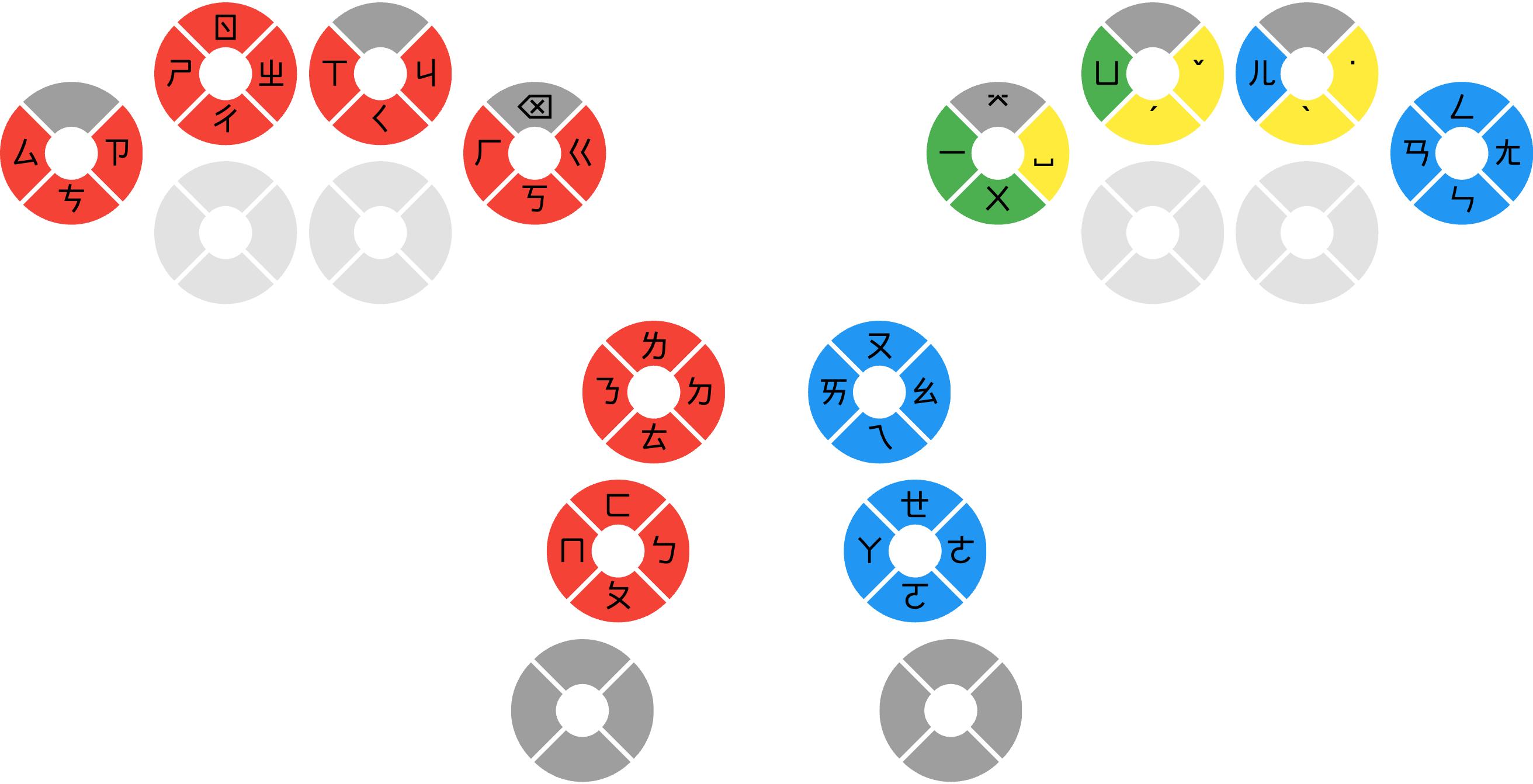
But as you see, some keys on pinky switches would be occupied by the Bopomofo symbols. It means that num-shift, shift, and mirror keys would lose their original position. It makes this layout difficult to coexist with the English layout.
Moreover, on TC41.V5, I can access all the rhyme keys (except ㄦ) with my right thumb only. But on M4G, I will need an additional finger for them.
Due to the mentioned drawbacks, I think that CC1 is much better for my usage (English + Chinese Bopomofo), so I am not going to switch to M4G for now unless I find a better solution for this.
¶(Used) Approach 2: Multiple Symbols per Key
Another possible way is to map multiple Bopomofo symbols on some keys. Some existing Bopomofo IMEs or layouts, like the Hsu Bopomofo layout (許氏鍵盤) and the Sound Chaser input method (追音輸入法), also have this kind of design to reduce the amount of required keys, and users would have shorter and fewer hand movements when using them.
But a possible drawback is that the number of possible Chinese words of a set of keystrokes might increase. In other words, we would get more possibilities to do word selection.
¶Analysis for Bopomofo combinations
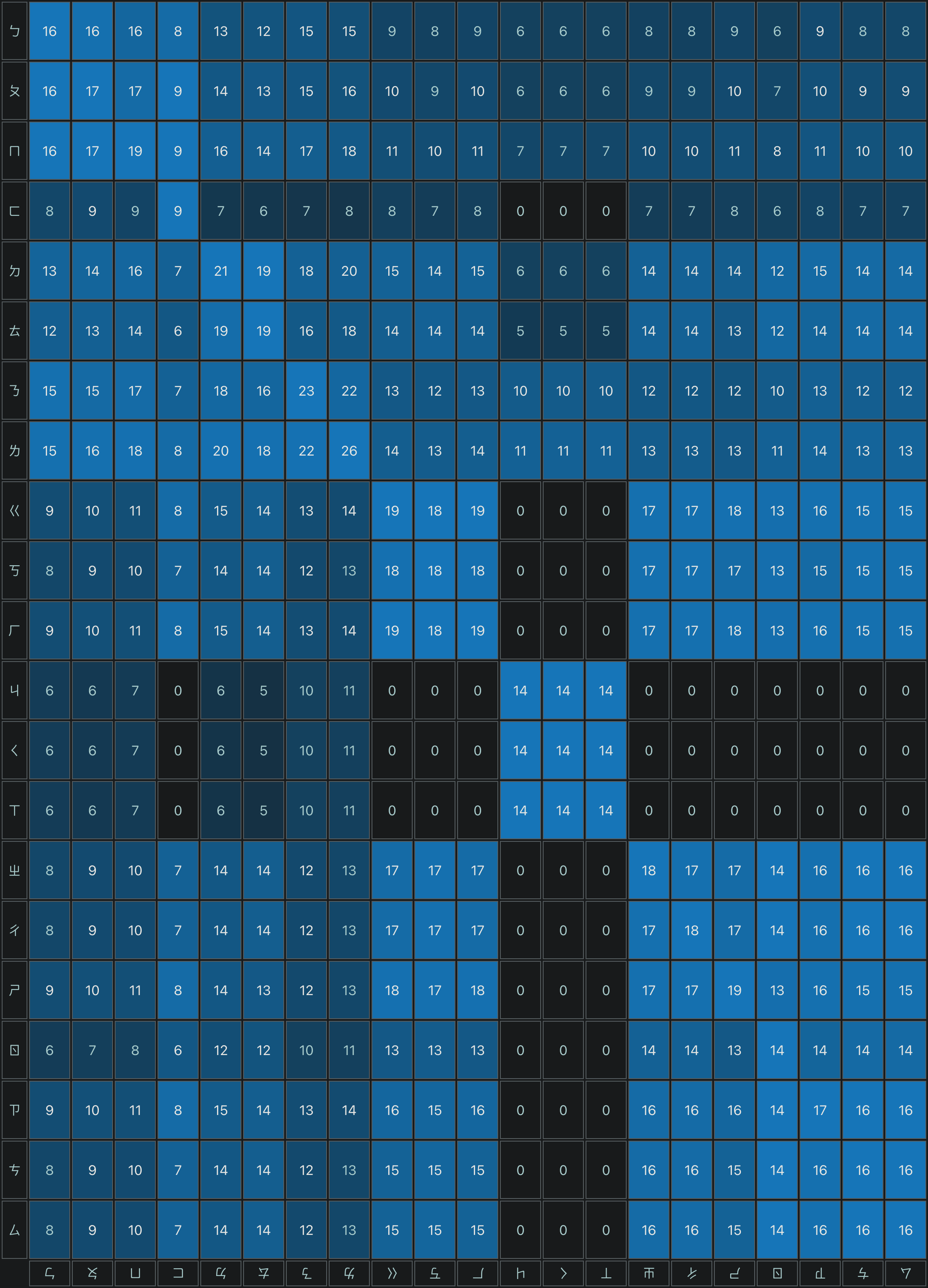
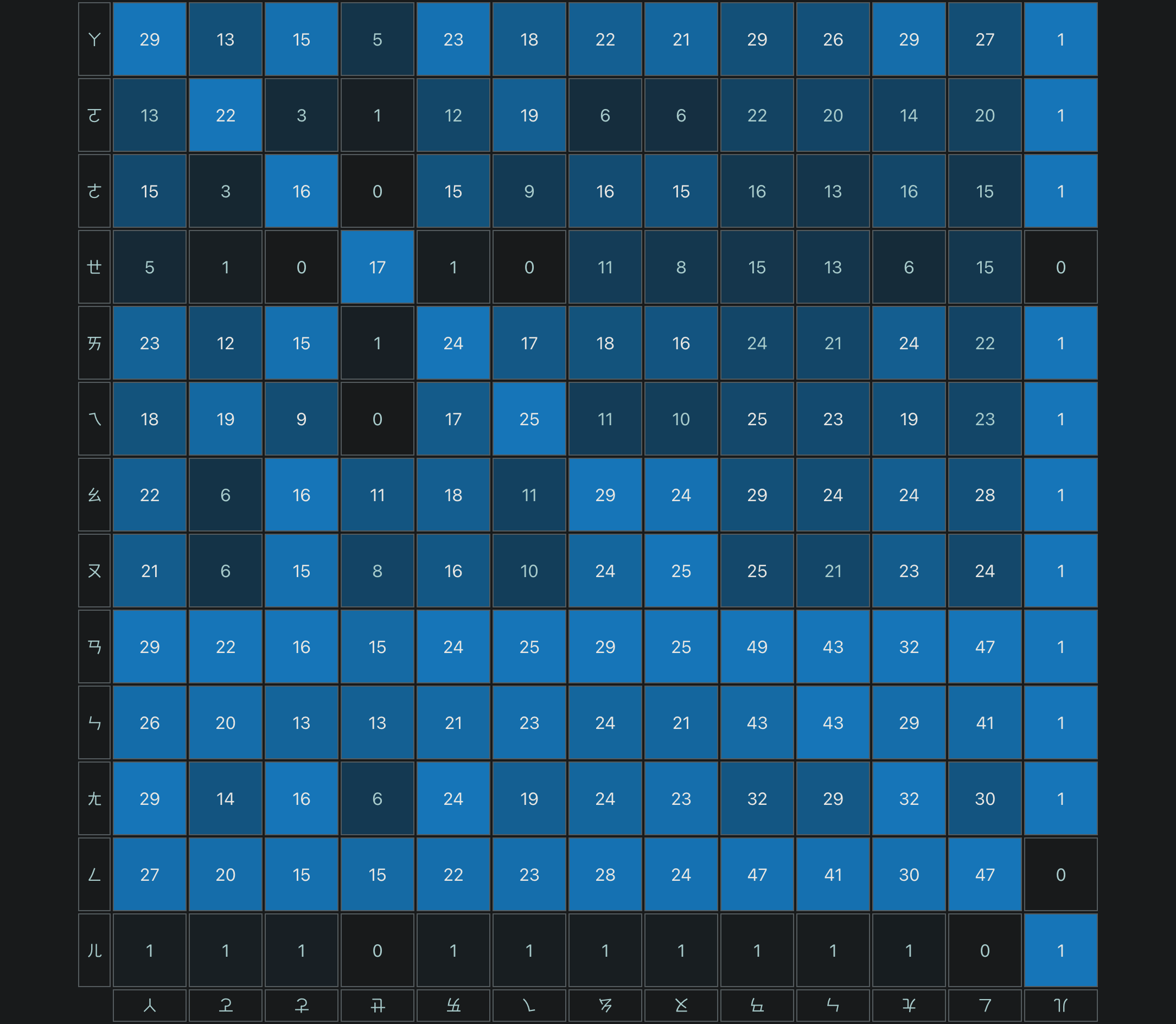
To decide which Bopomofo symbols to put together in a key, I used a list of all Bopomofo combinations from this Chinese dictionary, and calculated the overlap counts in every two consonants and every two rhymes, respectively. For example, both ㄅ and ㄐ have combinations with ㄧ, ㄧㄝ, ㄧㄠ, ㄧㄢ, ㄧㄣ, and ㄧㄥ, so their overlap count is 6. Then I plotted the counts on contingency tables as below.
¶Progress of designing the layout
¶1st iteration
Then I could choose groups with a smaller overlap count and put them on the same key, respectively.
I chose:
ㄍ-ㄐ,ㄎ-ㄑ,ㄏ-ㄒ, andㄥ-ㄦ, since they don’t have any overlap.ㄛ-ㄜ-ㄝ, since they have little overlap with each other (3,0,1).
And I modified the layout as shown in the image below.
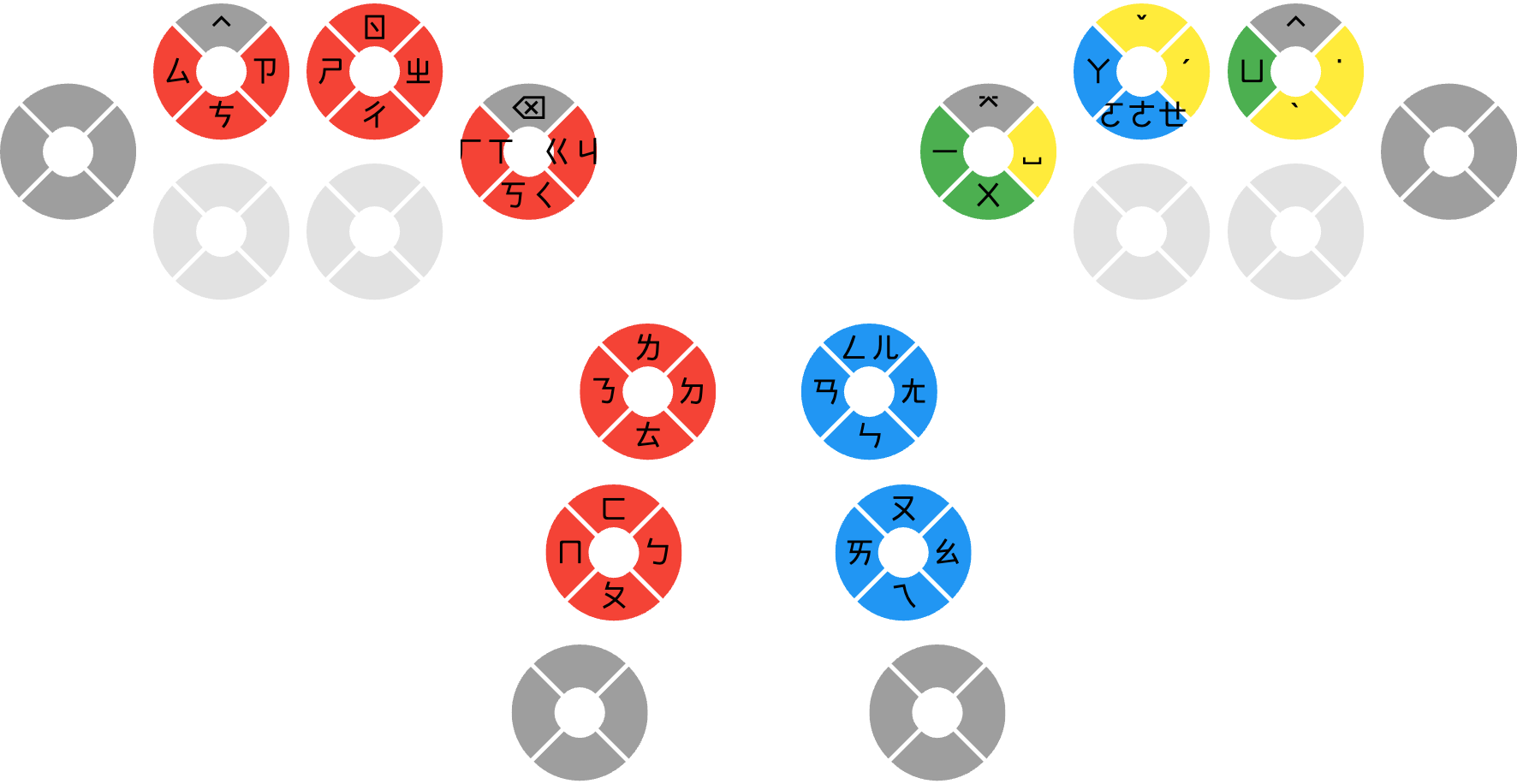
I tried to implement this at my fork of McBopomofo IME, and would reconsider ordering M4G if this works well finally.
¶2nd iteration - TanChord 36 Bopomofo (TC36) V1
After I implemented it, I found that McBopomofo seemed to have problems with the ㄛ-ㄜ-ㄝ group since they have some overlaps between them, so I changed the layout as below.
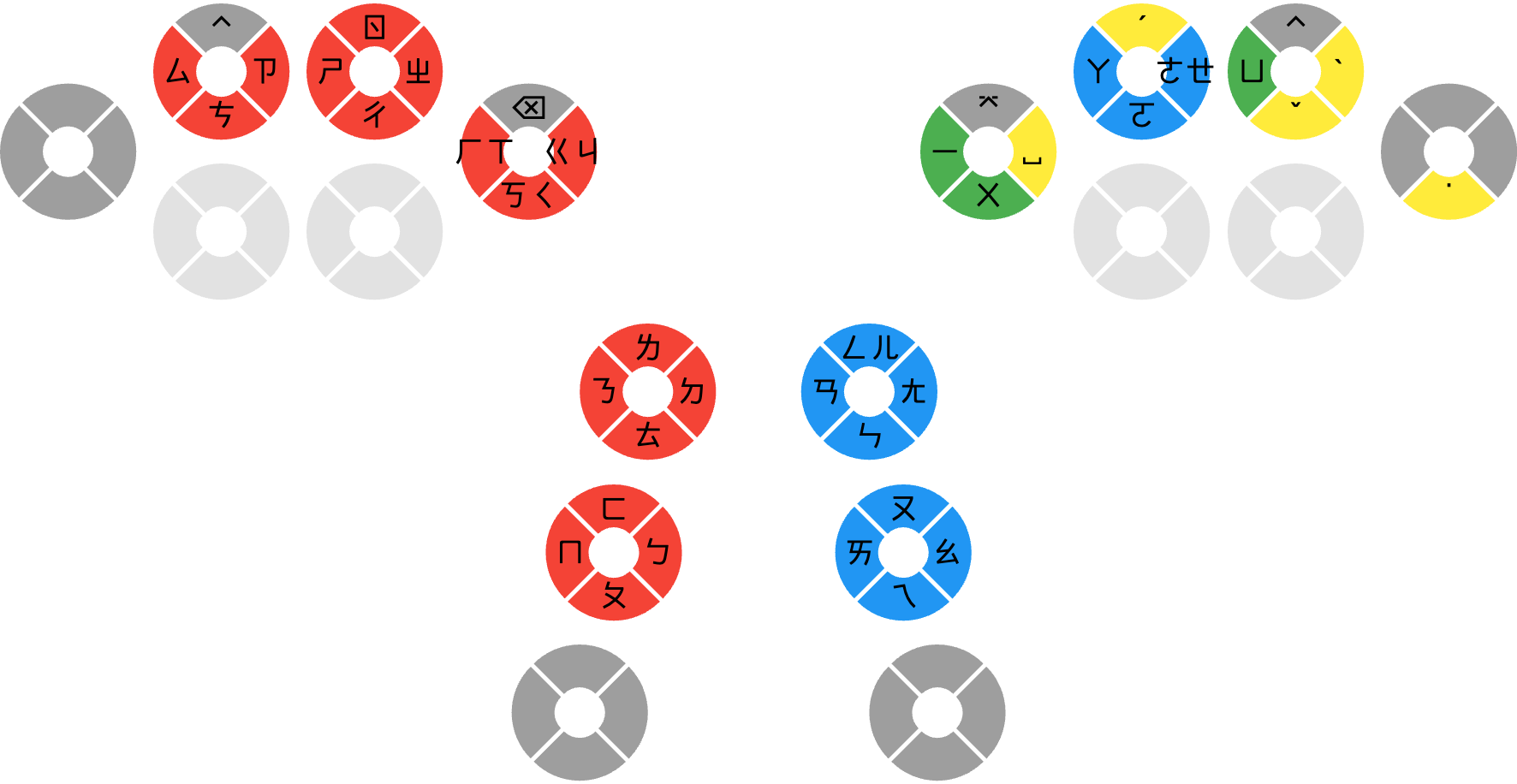
The right mirror key was replaced with / key.
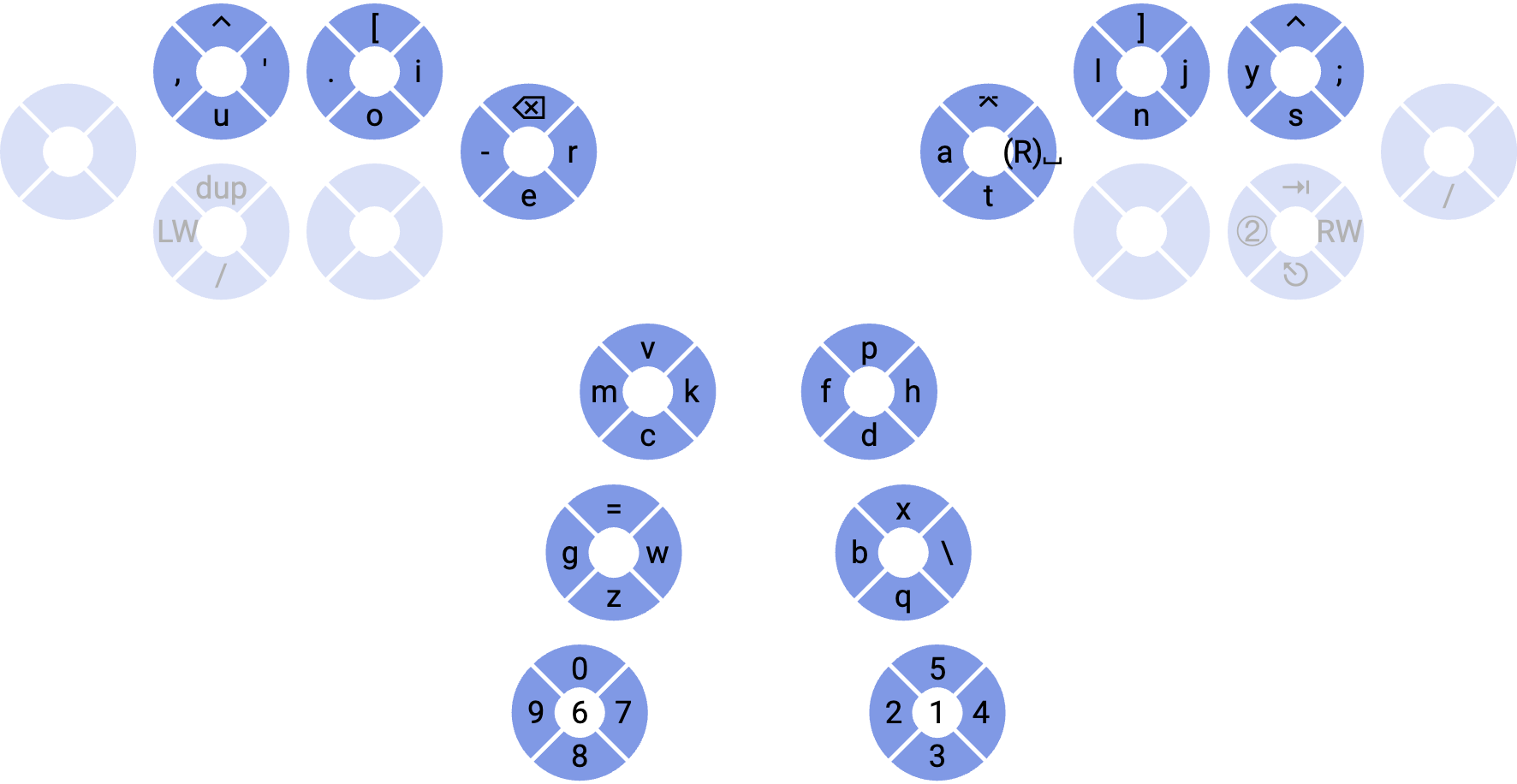
After some more tests on this, it seems that this layout and McBopomofo don’t work well together for Bopomofo chords, since McBopomofo expects the symbols to be input in the correct order to correctly choose which symbol to use for a keystroke. So I modified the logic to make it work. I name this layout TanChord 36 Bopomofo to distinguish it with the TanChord 41 Bopomofo layout.
(See Appendix A for the details about the logic for choosing symbols.)
¶Drawbacks
¶Hard to type Bopomofo password
For the TanChord 41 layout, I could make an additional OS layout for the Bopomofo password, because a key only maps to a symbol, and it’s easy to make a layout to map between CC1’s output and the Bopomofo password of a symbol.
But for the TanChord 36 layout, since there are multiple symbols on a key, it’s far more complex to deal with it. So I may just type it on a QWERTY keyboard, or use a password manager for it.
¶It might be confusing at first
This layout has multiple symbols on a key, and the final symbol of a keystroke is decided by some rules according to all the possible combinations of Bopomofo symbols (details in appendix A), so the displayed symbols in the buffer may be changed during typing.
For example, when I want to type ㄐㄧ, I may first hit the ㄍ/ㄐ key and then the ㄧ key. Because of the rule, the first symbol in the buffer would be changed from ㄍ to ㄐ after hitting the ㄧ key.
| Keystroke | Symbol in buffer |
|---|---|
ㄍ/ㄐ | ㄍ |
ㄧ | ㄐㄧ |
That’s why it is confusing at first, but it can be gotten used to with practice.
¶Updates
¶V2
After some tests, I found that words with ㄩㄝ are hard to type under the V1 layout, so I adjusted the layout like this.
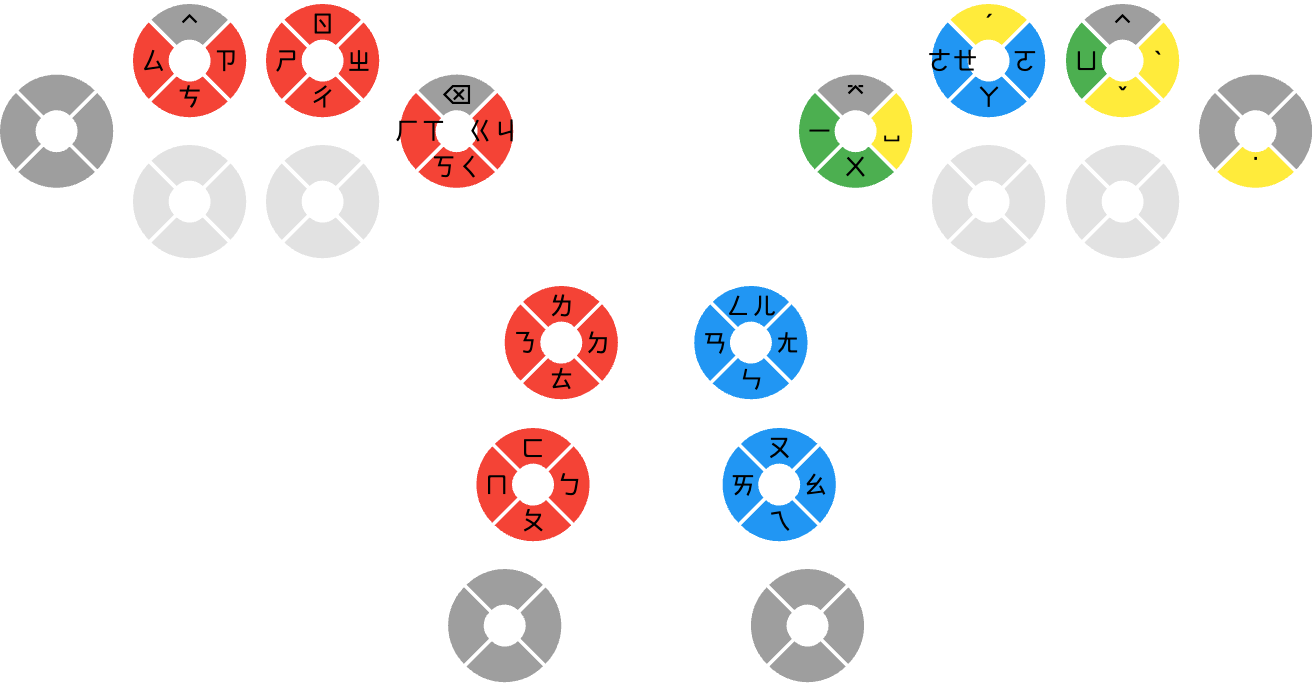
The ㄩ and ㄝ are in the same direction, so it’s easier to type ㄩㄝ. I seldom use ㄧㄛ words, so it’s okay to let ㄧ and ㄛ be in opposite directions.
¶V2.1
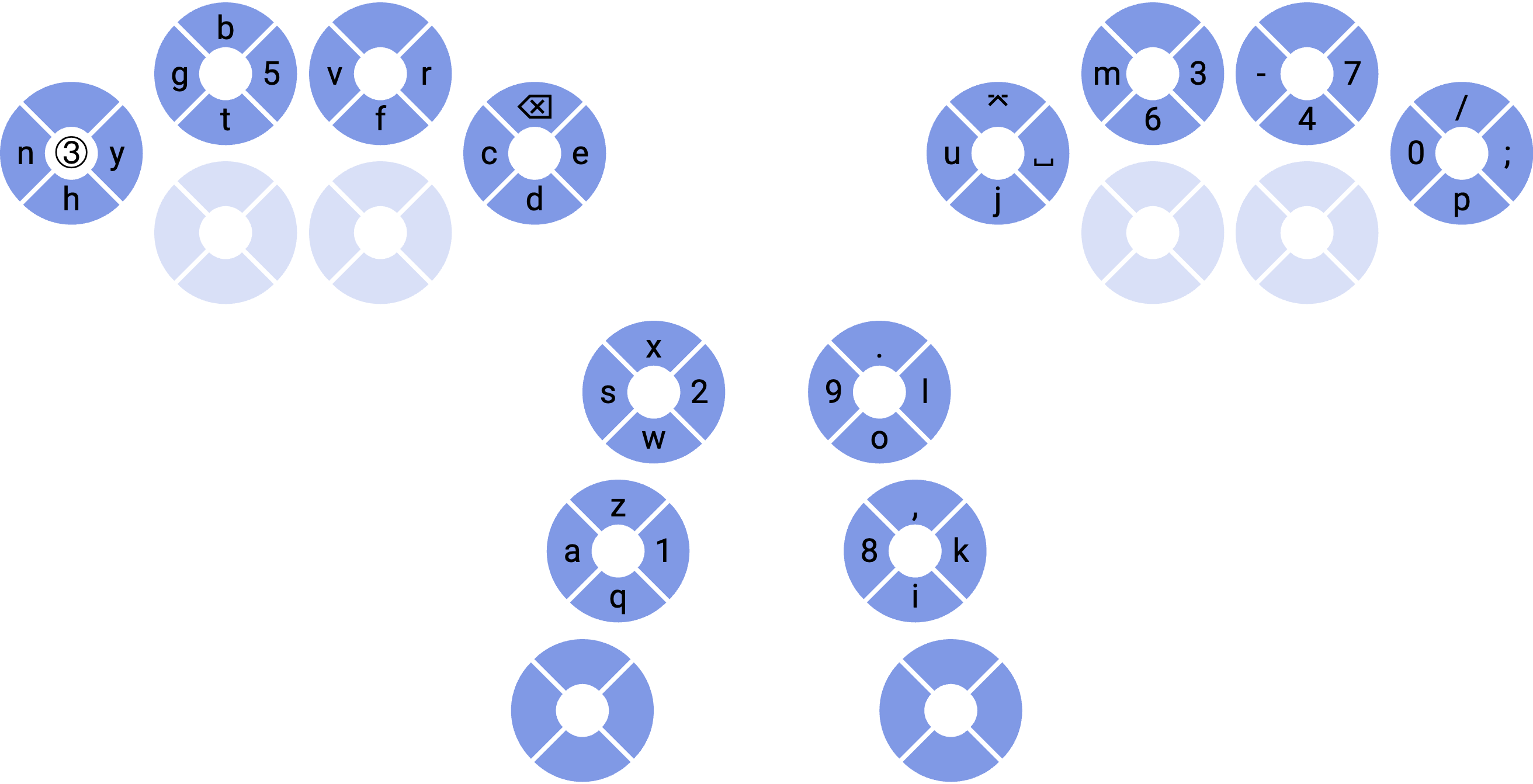
I may have to use a notebook from my company to work in the future, but my McBopomofo can’t be installed on it due to the information security policy of my company. To type Chinese with the built-in standard Bopomofo IME with CC1 or M4G, I remapped the A3 layer according to the layout shown in Approach 1 and the mapping of the Standard Bopomofo layout. Although I have to use two keystrokes to switch between Chinese and English (one for switching the layer of the device between A3 and A1, another for switching the input source on the OS), this is the only way I can think of under these conditions.
The following is the Bopomofo layout and the corresponding A3 layer.
¶V2.2
To balance the workload on both hands when I click on CC1, I decided to remap all mouse clicks (left, middle, and right) to both thumb 2 switches on the numeric layer.
The following is the numeric layer after changes.
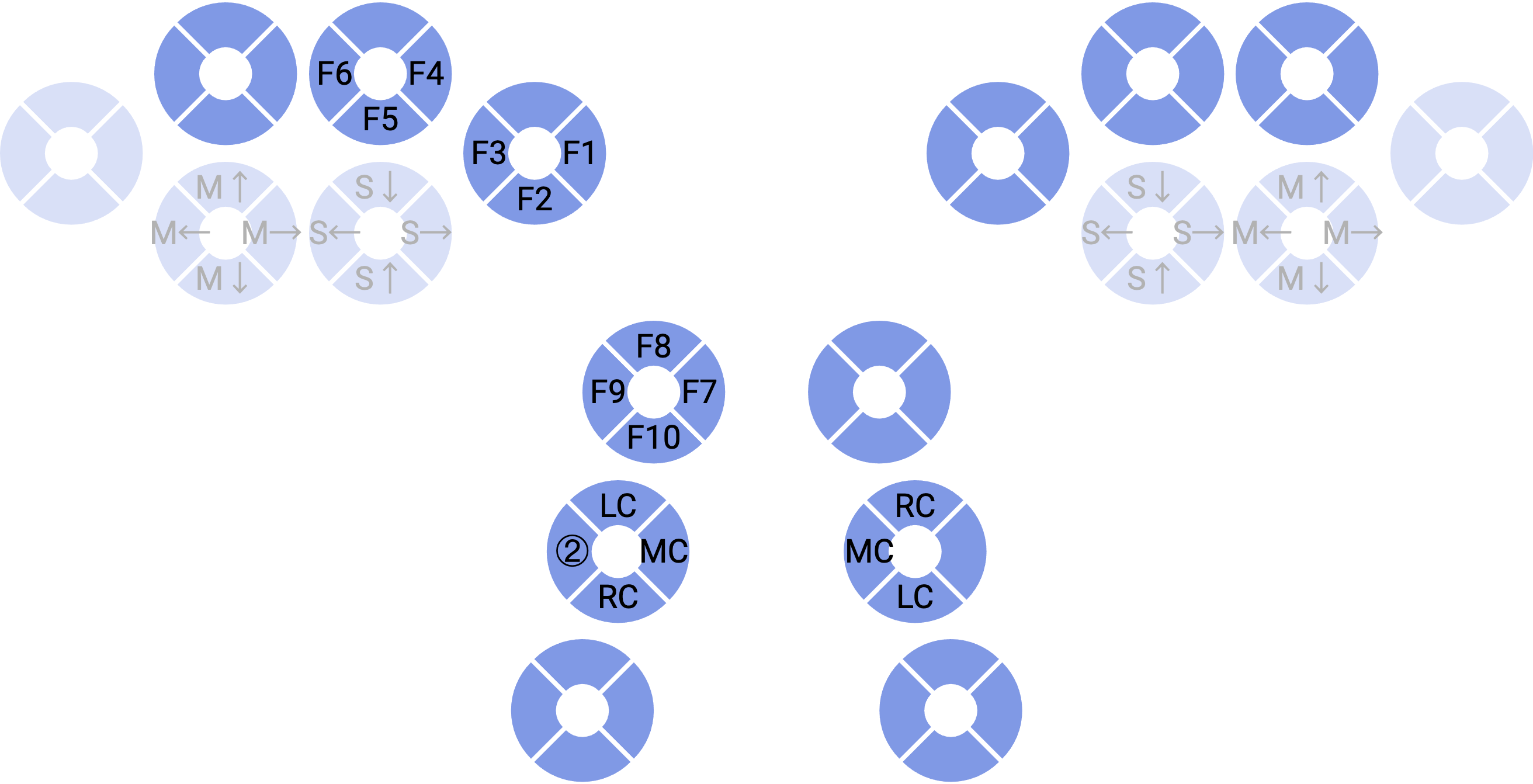
- ②: numeric layer key
- M(arrow): mouse move
- S(arrow): mouse scroll
- LC, MC, RC: mouse left, middle, right click
¶V2.3
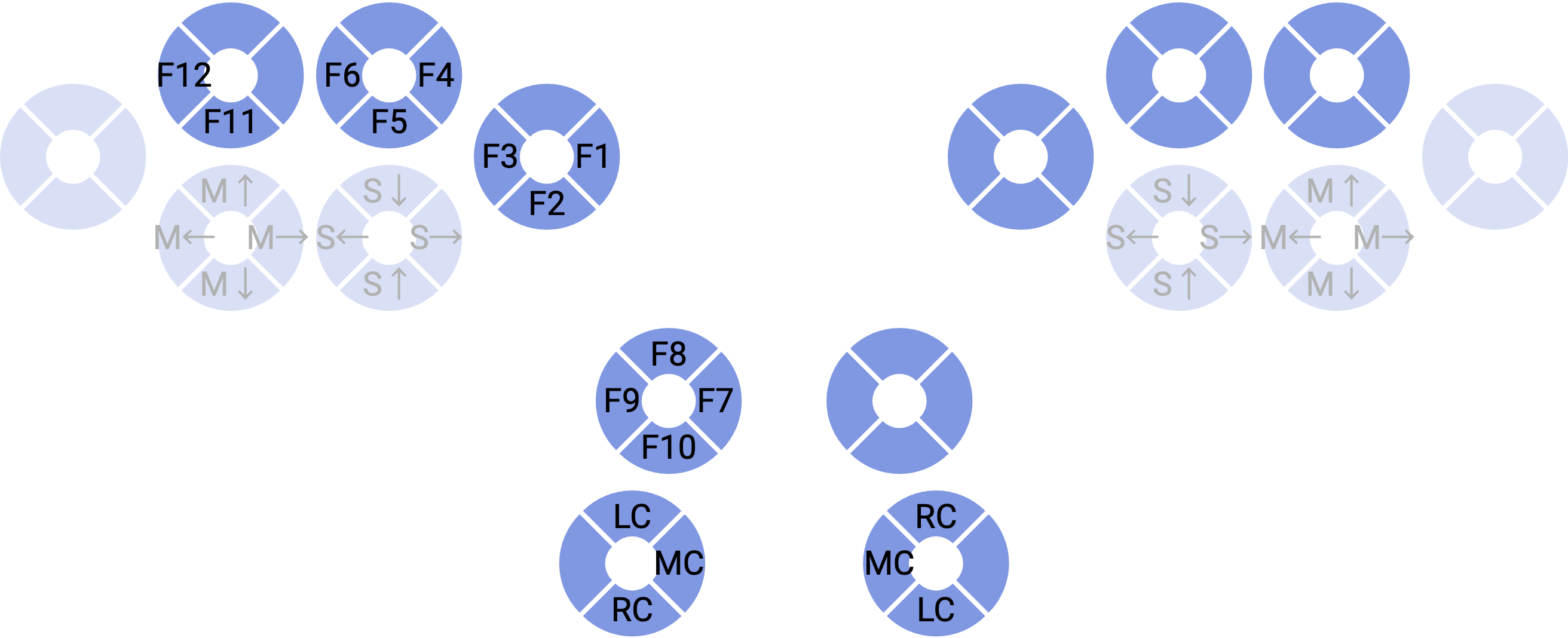
- I added back the missing F11 and F12 keys.
- I find that I can use the original num-shift key to unlock the numeric layer, so I drop the numeric layer key on the left thumb middle switch.
(Numeric layer)
¶V2.4
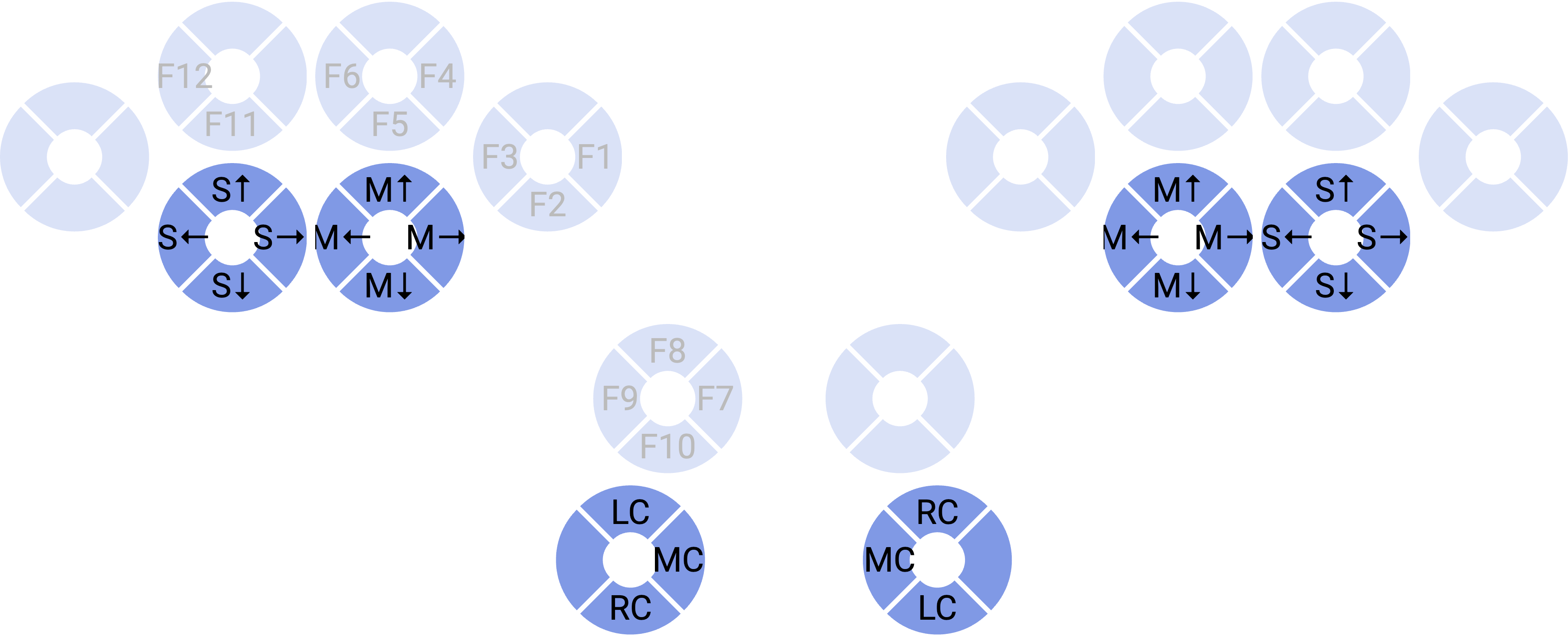
I swapped the mouse scroll switches and mouse movement switches. I felt that using the middle fingers to control the mouse movement is better than using my ring fingers.
(Numeric layer)
¶(Not used) Approach 3: Try the 3D presses on M4G
I can’t use 3D presses on CC1 because they require much force to use, and my weak fingers can’t deal with it. But if the 3D presses on M4G don’t require that much force, I could move some keys like tones to the 3D presses and leave more spaces to other Bopomofo symbols. But I need to wait until I try the 3D presses directly on M4G to see if this is a possible approach for me.
¶Appendix
¶A. TanChord 36 symbol choosing rules
The five pairs of Bopomofo symbols that are at the same keys on the TanChord 36 layout are:
ㄍ-ㄐ, ㄎ-ㄑ, ㄏ-T, ㄜ-ㄝ, ㄥ-ㄦ
IME needs to have a rule to decide which symbol to use in these pairs.
¶Rule for ㄍ-ㄐ, ㄎ-ㄑ, ㄏ-T, ㄜ-ㄝ
If we look into the combination of the first four pairs, we would discover that:
- For
ㄐ,ㄑ,ㄒ, andㄝ, the medial of all combinations of each of them can only beㄧorㄩ. - For
ㄍ,ㄎ,ㄏ, andㄜ, the medial of all combinations of each of them can only beㄨor(no medial).
So the IME can choose the symbols in these pairs by the rule: When ㄧ or ㄩ is in the buffer, choose ㄐ, ㄑ, ㄒ, or ㄝ. Otherwise, choose ㄍ, ㄎ, ㄏ, or ㄜ.
¶Rule for ㄥ-ㄦ
The ㄥ-ㄦ pair is relatively simple. Since ㄦ doesn’t have any combinations with any medial and consonant, the rule of IME is: When any medial or consonant exists in the buffer, choose ㄥ. Otherwise, choose ㄦ.